
To ask customers for Google reviews, choose the right time, send them your direct Google review link collected from Google Business Profile, ask through the right channel, and don’t spam.
Keep the ask personal, short, and to the point. Remove all the friction and make the process smoother. Don’t offer any rewards for reviews since it goes against the rules.
That’s the whole game in simple terms. However, finding the right time, reducing friction, and writing proper asking text require detailed explanation, and this article will walk you through all those steps.
Why Google reviews matter in 2026
Google reviews do four jobs at once, and the impact has been increasing.
- They help you rank – Reviews impact your local search signals in search results and Maps. Signals like quantity, recency, rating, and wording are the strongest levers you can use to rank higher. It is assumed that reviews impact 9-15% of local pack ranking.
- They convert customers – A business with a healthy star rating and recent reviews gets more clicks, and the audience trusts that business more than a business with poor ratings. It improves CTR and conversions.
- They give you feedback: Reviews show your service quality and shortcomings. You can use them to improve your service quality and focus on the right things to scale.
- And now – they feed AI answers: AI tools like ChatGPT, Gemini, or Perplexity cite businesses or brands with good trust signals. Reviews now act as an input for AI tools to describe your business.
Before you ask: 3 things that quietly kill review campaigns
Asking is important, but removing these three things will increase conversions and reduce failure.
Complete profile, merge duplicate or outdated Business Profiles first
Your profile is what customers see when they land on it. The profile has to be complete with all the information, pictures, and videos. If your business has moved, rebranded, or listed twice, merge those profiles through Google Business Profile support or flag it as a duplicate.
Ask customers to use an active Google account.
Google often removes genuine reviews from accounts that look suspicious, such as brand-new Google accounts and accounts with no history. Ask your customers to use an active and personal Google account that they use regularly. It feels like a small detail, but it creates the difference between a review that sticks and one that vanishes.
Register for A2P 10DLC before you text anyone (U.S.)
If you want to use SMS to ask your customers to write reviews, you need A2P 10DLC. It is a business-to-consumer SMS registration needed in the United States. If you don’t have it, the reach will be zero. No one will receive your message. So register it to increase the reach.
Step 1: Get your Google review link and QR code
The review link or QR code should land exactly on the ‘Write a review’ section. Customers must not search for your profile or business to write a review. A single barrier to leaving reviews is where most customers give up. So make it smooth and one click.
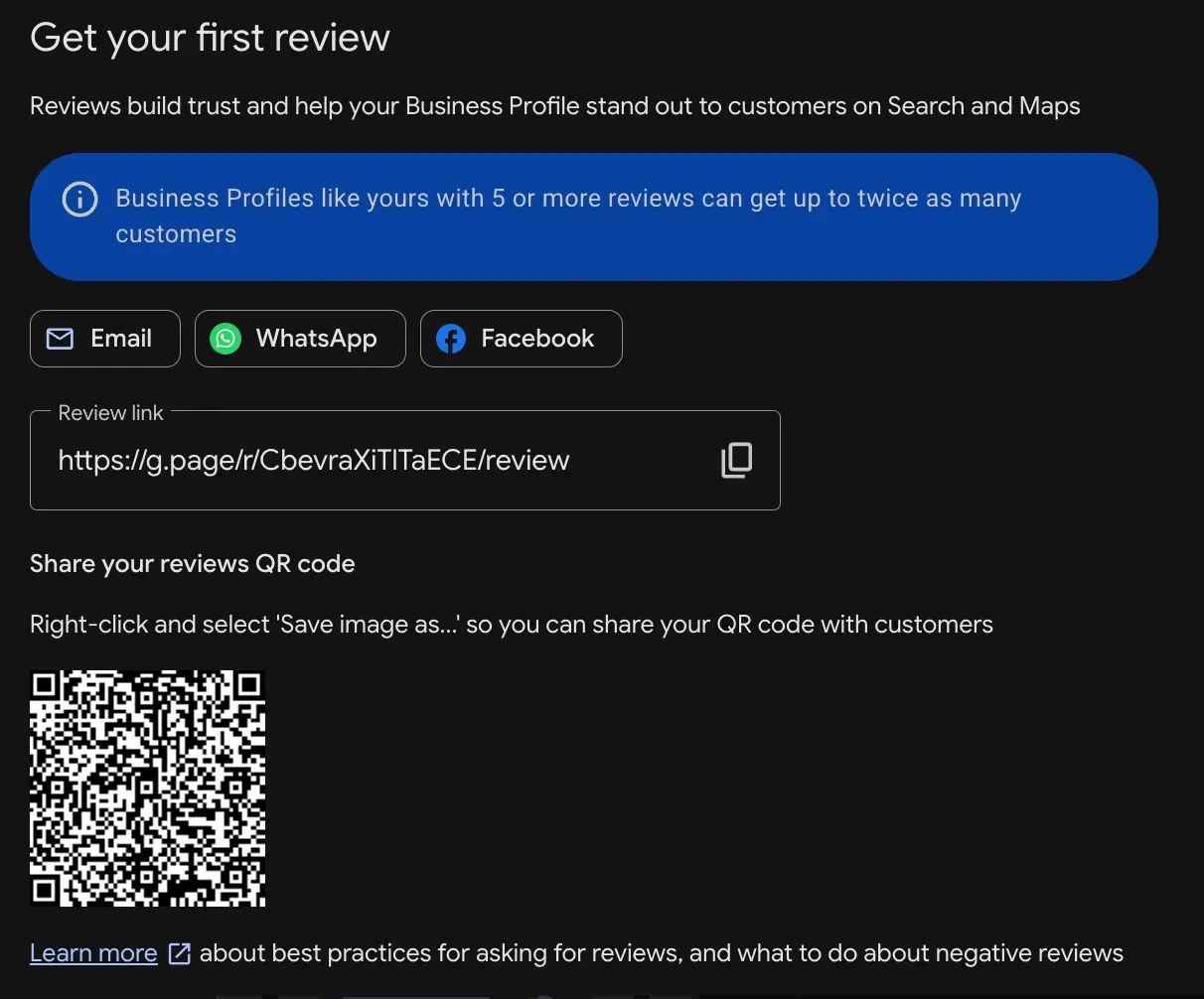
To get your direct link:
- Sign in to your Google Business Profile.
- Open the dashboard.
- Click Read reviews and then the “Get more reviews” button.
- Copy the short link that will look like g.page/r/XXXXXXXX/review.
- Right-click the QR code from the same screen and download it for future use.
Remember that the QR code is only visible on the desktop version, not on mobile. Check the link or QR code from your mobile to be sure that you have not got the wrong link.
If you don’t find the ‘Get More Reviews’ button, chances are high that your profile is not verified or you are signed in with the wrong account. Fix the problem first to get the button. You can print the downloaded QR code on a card for physical presence. This is an idea for field-based businesses. You can also use any free QR code generator with the link.
Step 2: Ask at the right time
Timing beats everything. A mediocre request at the right moment outperforms a polished one sent at the wrong time. The golden rule here is to ask customers when they are happiest and the experience is fresh.
A few timing cues:
- Ask during checkout if you are running an offline business.
- After a satisfied customer service interaction, when they have got the solution to the problem.
- Post-service/post-purchase is a good time to ask.
- After a compliment. If a customer thanks you or praises the service, that’s the opening. Politely ask them to write a review.
- Not while they are upset. This is a red flag. Never ask a customer during a rough experience. Fix the problem first and then ask for a review.
Step 3: How to ask, channel by channel
Asking customers through the wrong channel reduces conversions. You need to understand the customers and find the channels they are using. Most local businesses use text for sending requests, and some use email. Physical businesses use QR codes during the magic moment.
Which channel actually converts
SMS has a 98% open rate. But open rate and conversion rate are not the same. Let’s see the table for better understanding.
| Channel | Typical response/conversion | Best for |
|---|---|---|
| In-person (QR/verbal) | 57% response if sent in the moment. | Physical locations, restaurants, salons, and retail. |
| SMS/text | 45% response with ~21-40% conversions. | Service businesses with a mobile number database. |
| QR code (printed) | ~12-13% scan. | Receipts, packaging, tables, field services. |
| Falling – averaged ~2.5%. | Considered purchases, E-commerce, follow-up. |
Text and in-person/QR are the key players here, and use email for a supporting role, especially for follow-ups. However, do not rely on a single channel.
By text (SMS)
Keep it short, understand the audience and your business, make the ask, and add a link.
Hi [Name], thanks for purchasing from [Business] today! If you have 40 seconds, we’d really love to have a quick Google review: [link]. Reply STOP to opt out.
By email
Subject: Quick favor for [Name]?
Hi [Name],
Thanks again for choosing our (product/service). We would love to have your feedback, and it will help people understand our business better. Please share your experience so customers can understand who to trust. It will be a big help for future customers and us.
[review link]
Thank you, [Your name], [Business]
In person
The most effective and most underused. You’re right there, so it won’t get lost.
“So glad you have enjoyed our service! If you have a minute, a Google review would help a small business like ours. Scan this QR code, or I can send you the direct link now.”
Get the review instantly when you are present to ensure maximum conversions.
QR code and signage
Set the printed or digital QR code where your customers are sitting or paying. Receipts, the table tent, the invoice, and the packaging are some good places. Add a proper instruction and one-line prompt such as “Enjoyed our service? Scan to leave a review to help us” so people can easily understand and find a reason to scan.
Step 4: Copy-paste templates
These are some examples, and you can customize the bracketed parts to maintain your brand voice. However, we suggest using this for a basic idea and adding your touch to the template. Keep an opt-out option for any text you send in the US.
Post-service SMS
[Name], thanks for choosing our business [Business] today. Would you mind sharing your experience in a Google review? It takes less than a minute and helps us a lot [link]. Reply STOP to opt out.
Post-purchase email
Hi [Name], thanks for choosing our product . Would you please write a review to help other shoppers decide with confidence? Leave one here: [link]. Thanks!
Follow-up (send once, 48-72 hours later, only if no response)
Hi [Name], just a reminder in case you missed my note. If you have a second, a quick Google review will really help us. [link]. Thanks again!
Email-signature evergreen line
Happy with our product/service? [Leave us a Google review] – it takes seconds but helps our small business a lot.
In-person verbal script
“We are really glad to help you. A Google review will make a huge difference for our small team. Would you please leave one for us? I can send the direct link to your phone.”
Do not send more than one follow-up since it will disturb the customers and create a negative impression.
The 2026 rules: what’s newly banned (read this or lose reviews)
Google has tightened its review policies to make the system more trustworthy. Several practices were standard previously but are prohibited now.
You can no longer ask customers to mention staff by name
For years, businesses requested that users mention staff by name in the reviews to make them more authentic. However, Google flags this as an unnatural pattern and removes such reviews. Organic, unprompted, and natural mentions are still fine, but you cannot ask customers to do so.
No on-premises pressure, kiosks, or shared tablets
Google explicitly prohibits pressuring your customers to write a review while they are on your premises. It even bans shared tablets, review kiosks, and in-store review stations. This was a practice in auto, healthcare, and aesthetics. Ask customers to share their experience later from their own device.
Review gating is banned – and enforced.
“Gating” means selecting satisfied customers to write a review by asking ‘were you happy?’ and sending links to those who say yes. It was a popular method to ensure 100% positive reviews but is now prohibited. You must send a review link to everyone – satisfied and unhappy customers.
No incentives – and this is now a federal issue in the U.S.
Google and other platforms always ban incentivized reviews. You can not offer gifts, discounts, or loyalty bonuses in exchange for a review. Google will remove any reviews that seem incentivized.
Along with that, the FTC’s fake review rules make buying or selling fake reviews and incentivizing reviews a federal crime. You can face civil penalties of up to $51,744 per violation. For a small business, this is a huge penalty.
But remember that you can still ask for genuine reviews. The only problem is manipulation. You cannot manipulate the reviews at all. If you are not sure about getting more reviews without manipulation, I strongly suggest you consult a review management expert like TheSmmExpert to create a better strategy to get more and more organic Google reviews.
“My customer left a review, but it’s not showing up”
This is a common frustration business owners often face. Here’s how to diagnose and fix it.
It might be a Google bug, not you.
Google has had these removal and display incidents. In the recent time, two separate problems hit within days. Reviews disappeared from live listings, and a display bug where the management panel showed zero in spite of showing hundreds of reviews publicly. One business owner shared that his reviews dropped from 4651 to 53 within 24 hours. Check Google forums to understand whether it is happening with you or others as well.
It might be the spam filter.
Google often hides or removes reviews it thinks are manipulated. You will not know it. Even genuine reviews get caught when the reviewer uses unusual locations and brand-new accounts, or when the reviews come from the same network in a short burst. These reviews get into the automated spam filter.
It might be the wrong listing or an old app.
If you have multiple profiles, the reviewer might leave a review on the wrong listing that you are not watching. Even customers on an outdated Google Maps version cannot submit the reviews at all.
What to actually do to fix the problems
- Wait 24-72 hours: Reviews are checked for policy compliance. So wait 24-72 hours for the reviews to appear.
- Remove duplicate profile: If you have a duplicate profile, remove it and keep only one profile.
- Don’t ask them to re-post: Don’t ask customers to re-post since it can trip the reviews in the spam filter. Wait for a few days before asking to re-post.
- Document everything – Screenshot everything while visible and document log dates and customer confirmation for future appeal.
- Appeal through the Google Business Profile Community: If you lose a genuine review in error, appeal through Google Business Profile Community with proof. Product experts often monitor those communities and forums that regular support cannot.
We have a complete guide for review disappearing[Google Reviews Disappeared]. You can check this out.
How many reviews do you actually need to rank?
Though there is no exact number to rank, here is an estimate based on the industry.
| Industry | Reviews to be competitive (competitive metro) |
|---|---|
| HVAC/plumbing | 130-260 |
| Dental practices | 150-300 |
| General contractors | 50-100 |
| Physical therapy/locksmith | 50-90 |
| Most categories in low-competition markets | 30-60 |
How to set your own target: The best way to set a target is to check your top 3 competitors. Open their review page and count. You need to beat them to rank higher. Set a realistic deadline to achieve the goal.
Velocity may matter more than the total.
A consistent flow of fresh reviews beats a higher number. 1-2 reviews daily throughout a 90-day period beats 500 reviews that all landed two years ago and stopped. So build a system that will help you get consistent reviews.
How to respond to reviews
Responding is also important to getting reviews, and it signals to future customers that you are active and care about their feedback. Besides, this is one way of asking, since when someone sees their feedback is valued, they are encouraged to leave reviews as well.
- Positive reviews: Thank them, be precise, and encourage. “Thanks for choosing us, [Name] – glad the [specific thing] worked out as you expected. Visit next time!”
- Negative reviews: Acknowledge the issue, apologize, respond calmly and publicly, and move the details offline. ‘Sorry to hear that. I would love to make this right. Would you please email me at [Address]?’ Understanding the pain point and a thoughtful response will build more trust with future customers.

- Respond to everything promptly: Businesses that reply to all the reviews within the first 24 hours tend to earn more reviews.
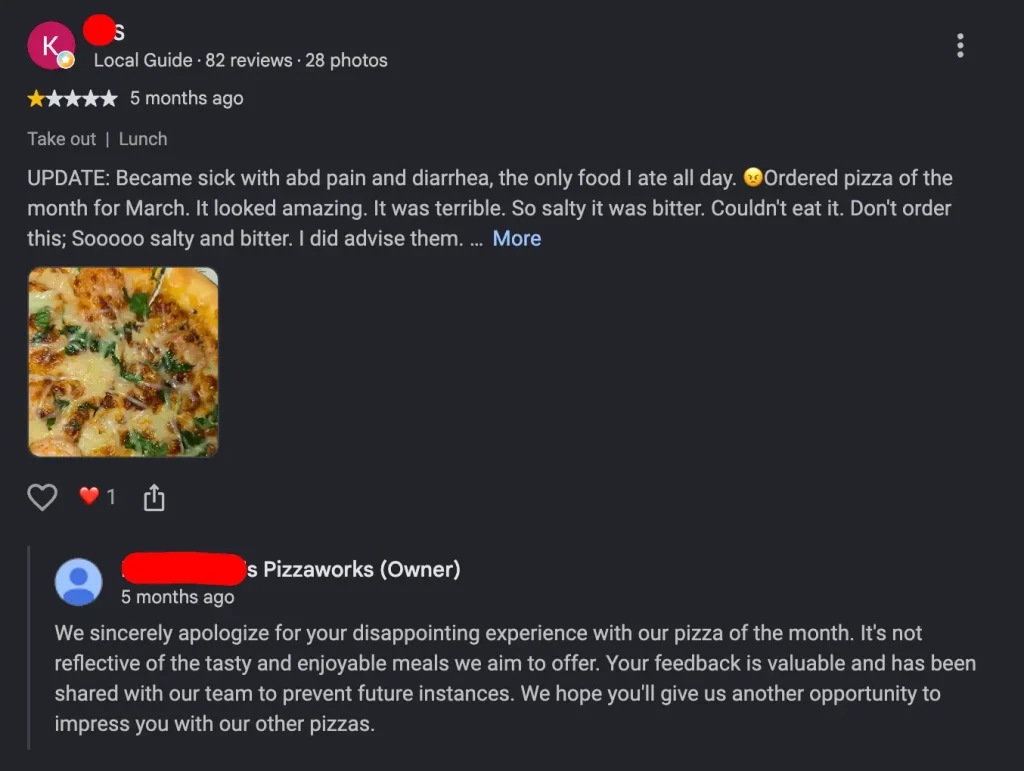
Remember that negative reviews are not always bad. Take them as suggestions for improvement and work on the flaws. Also, handle negative reviews properly to turn them into positive ones. We have a complete guide on How to Respond to Negative Google Reviews. Check it out.
FAQ
Is it legal to ask customers for Google reviews?
Yes. It is 100% legal and encouraged to ask your customers for Google reviews. However, you cannot offer incentives and gate by sentiment. Ask freely for reviews and don’t manipulate the outcome.
Can I offer a discount or gift for a Google review?
No. Google strictly prohibits discounts or gifts for reviews. It also violates the FTC’s Fake Review Rule, and it can cause penalties of up to $51,744 per violation.
Can I ask a customer to mention the employee who helped them?
Not anymore. Google instructs not to mention any staff names in the reviews. If you still ask a customer to mention a name, it will violate the rules and your reviews will be removed.
Can I use a tablet or kiosk in my shop for customers to leave reviews?
No. You cannot use a tablet or kiosk in your shop or service stations for customers to leave reviews. Customers must use their own device to write the reviews.
How many Google reviews do I need to rank in the map pack?
The number depends on your industry, business size, and competition. You can expect to rank with 100+ reviews if your competition is low. But remember, consistency beats the number. So keep getting fresh reviews.
How long does a Google review take to appear?
It takes 24-72 hours for a Google review to appear because the reviews are checked for policy compliance. If you still cannot see the reviews, contact the support system.
What’s the best way to ask – text, email, or in person?
In-person and text convert best. Email is good for follow-ups. However, check where your customers are more active and use that channel. Also, use all the channels to ensure maximum conversions.
How often should I send review requests?
Send the review request within the first 24 hours when the experience is fresh. Use a follow-up request within the next 72 hours if you don’t get a response to the first request. But don’t send any other follow-ups.
Can I ask for reviews on social media?
Yes, you can ask for reviews on social media, and you can use DM or comments to ask personally.
Do I need paid software to collect Google reviews?
No. You don’t need paid software to collect Google reviews. Google Business Profile offers a review link that you can use to collect reviews.

