On this page
- Is it happening to everyone right now? (Live incident status)
- How to tell if you’re in a platform-wide wave vs. a you-only problem
- First – diagnose it. Deleted, hidden, or just delayed?
- Why Google reviews disappear – every real cause
- A new review not showing up? That’s a different problem (delay vs. removal)
- What the data says about which reviews vanish
- How to get missing reviews back – step-by-step solution.
- “Google support isn’t helping” – setting realistic expectations.
- How to prevent it (and build a profile that absorbs losses)
- FAQ
There are many reasons why your Google Reviews Disappeared overnight. Google has recently become very strict with its review criteria to make sure its site is not full of fake reviews.
They have implemented an AI filtering system that removes what it considers spam reviews, and have also updated their policies regarding what they consider invalid reviews. But sometimes the missing reviews are just a glitch from the platform.
We’ll look at different ways you can figure out the reason your reviews have been removed, taken into a verification process for raising some flags according to Google’s new parameters, and how you can get them back.
Is it happening to everyone right now? (Live incident status)
February 2025 – Lots of businesses reported losing lots of reviews overnight. Google reported that it was a display issue and that the actual reviews weren’t deleted; they just weren’t visible, and they quickly fixed the issue.
October-November 2025 – Google deleted a large number of reviews that were filtered by them using their policies and guidelines. However, lots of real, authentic reviews were deleted as well; they were recovered by Google.
February 2026 (two separate incidents) – Google started using AI tools to auto-filter reviews that violate its policies. Lots of reviews weren’t allowed to get published. And in another case, the review count stayed the same for Google Business Profiles, but individual reviews vanished from the public list. These were due to being flagged by Google’s algorithm.
Mid-February 2026 – From a large sample of companies, around 4.3 million of their reviews were deleted by Google. After a verification period, 500,000 of their reviews, a margin of 12%, were permanently deleted, whereas the verified approx. 3.8 million were given back.
Early March 2026 – In another incident in the following month for the same company base, 2 million of their reviews were taken in for review before reappearing after a week of verification.
July 2026 – Business owners were finding that a huge chunk of their reviews were deleted and new review submissions were frozen. It was later disclosed that if Google finds any suspicious activity from a Business Profile, they pause reviews and take old ones for verification. After they are verified, they are returned to the profile.
How to tell if you’re in a platform-wide wave vs. a you-only problem
Although Google has been seen taking away reviews for verification and violating their rules, it’s not always the case. Sometimes, the reason might be some of the recent changes you’ve made to your profile.
If you have not made any recent changes, go look at public forums such as the Google Support Page to see if other people are facing the same issues as well. If you see people complaining about the same issues in multiple forums, it’s most likely a platform-wide occurrence.
On the other hand, if you recently changed something to your profile that might break the rules and regulations of Google or the FTC or other regulatory bodies, such as getting reviews from family members, review gating to filter out negative reviews, or incentivising positive reviews, then your reviews were taken down due to violating the policy of these governing bodies.
First – diagnose it. Deleted, hidden, or just delayed?
The first thing you need to do when reviews go missing is find the root cause and take appropriate action. These are the things you should do:
Wait 48-72 hours.
You don’t need to panic right away if some of your reviews seem to have disappeared or new reviews are not showing. Regular maintenance work from Google usually takes around 2-3 days to complete verification for reviews. Wait until the time is up and then take action if the reviews aren’t back yet.
Check the reviewer’s own profile (the fastest bug-vs-removal test).
After waiting for a couple of days, if the reviews aren’t restored, look at the profile of the reviewers whose reviews got deleted. There might be suspicious activity on their profile that breaks Google’s rules. You can understand if the reviewers themselves are the issue or not.
Compare across devices and surfaces.
To identify if the review is actually deleted or not, check across multiple devices and multiple gateways. If your reviewer can see the review but it doesn’t appear in your profile, it means it’s being verified by Google. You can also check on multiple platforms to understand if it’s a platform issue or an issue with the review itself.
Check your GBP dashboard vs. your public listing.
If your profile review dashboard and public review count don’t match, it means some reviews have been removed by Google for either violating Google’s platform policies, being filtered by their AI for suspicious behaviour, or being taken down for review if they are fake reviews or not. Wait a week before taking action.
Read the timeline.
Trace your steps back to see if you made any changes to your profile that may have caused this issue. If you have taken any initiatives that break Google’s policy, such as incentivising customers for reviews or only posting positive reviews on your site, your reviews could be deleted. If you haven’t done such a thing, look at public forums to see if everyone is facing issues or not.
Why Google reviews disappear – every real cause
Automated spam filters (and Gemini AI moderation)
After implementing AI-driven systems that filter Google reviews, which causes suspicion of breaking platform policies, Google has deleted over 292 million reviews in 2025; this number was 240 million deleted in 2024, and it was only 55 million in 2020. It now seems that roughly 1 in 5 review submissions do not make it into the profiles or websites.
Policy violations
Google has listed a number of policies for their platforms. Violating these will get your reviews deleted or removed. They are:
- Fake & Misleading Content & Reviews. Reviews that try to boost the rating of the business by writing very nice things.
- Impersonation. Reviews that try to claim the identity of another person. This reduces the credibility of the review.
- Misinformation. Writing about a business using false information to destroy its reputation.
- Misrepresentation. Omitting facts and distorting information to make the business look bad to readers. Defacement & Mischief – editing information with false facts.
- Offensive content. Harassment and Hate speech against certain people or businesses by threatening to attack them or cause harm. Dangerous content is also a part of this.
- Personal information. Disclosing personal information about the people of the business that may cause safety issues.
- Obscenity & profanity. Anything starting from sexually explicit content to adult-themed content, violence, and gore. These are all part of restricted content that Google doesn’t allow.
- Child safety and Terrorist content. Any content that promotes child abuse and content that incites violence against organisations.
- Off-topic. Reviews not relevant to the topics also violate Google’s review policies and are taken down.
- Advertising & solicitation. Using Unclear and Repetitive Content to boost business image and using advertisements instead of adding actual valuable reviews.
Review gating – and the “5-day disappearing review” pattern
Review gating is the action of manipulating your Business Profile rating by only nudging happy customers to write reviews on the platform and ignoring the negative reviews.
This is against the new rules set by Google and the FTC. Review gating can get you fined up to $50,000+, and it can also block all your incoming reviews and delete all your previous ones, as it is a serious offence.
There’s a new automated filter that Google has implemented where its trained AI takes down new reviews almost exactly five days later, after they’ve been posted. It’s a phenomenon that has raised some debates in public forums about Google’s practice without officially notifying the business owners.
The Google reviews will be brought back after a review period if they clear the verification check. But if your reviews violate any of Google’s policies, they will be taken down permanently.
The reviewer’s account was suspended or deleted.
Sometimes, the reviews are taken down if any suspicious activity is found in the reviewer’s account. These activities could include:
- Accessing the account from a different location, which might be because of using VPNs.
- No previous account history, where the user reviewed or performed any activity previously using this account.
- The account has a previous history of leaving bad reviews that violate Google’s platform policies.
- The account is trying to impersonate another person.
- No data in the reviewer’s account, but lots of similar-looking reviews posted.
Profile changes – merge, duplicate, NAP, category, relocation.
Sometimes your reviews aren’t deleted; they are divided across multiple duplicate profiles of your business. There are many reasons that your profile might be duplicated, and it has to do with the review platforms as well.
If there is no consistency in your NAP – name, address, and phone across multiple platforms and websites, the review platforms identify these businesses as different entities and create different profiles for them.
Depending on the status of the duplicate profiles, you will need to take the decision of either to merge, remove, or report a profile. If both profiles have important information and a good number of reviews, then the best choice of action is to merge the two profiles. But if a profile is really outdated, then it is best to remove the profile entirely.
There might also be the case of impersonation where someone else is claiming to have your business. You can report these cases to Google for review. Whenever you change your category or relocate to a new location, make sure to update all the different profiles and websites that you manage so that there is no issue of duplication in the near future.
Unverified, new, or inactive profiles
Not all customer reviews are treated the same by the platforms. Even though some platforms allow unverified users to write reviews, they are often given shadow bans. Google has updated its reviews policy to make sure all the reviews on a business profile are authentic.
Profiles that are inactive, new, or unverified raise a flag in the platform’s AI-driven filter. If a new profile without any prior review history is suddenly posting a lot of overwhelmingly positive or negative reviews, then it is a sign of rating manipulation.
Unverified profiles could also mean that people are writing fake reviews to tarnish the business’s reputation. These reviews are often taken down by Google for violating their regulations.
Profile suspension and the “reported as fake” wipe
Some competitors might use the strategy of mass reporting your business profile to get your profile suspended and permanently deleted. There are ways you can counter this. If many people are reporting your profile, your profile will be flagged and taken down by Google.
You will also lose all your reviews. You can appeal to Google and provide business documentation that shows proof of your existence and ownership of your business. This will stop competitors from deleting your profile.
The legal and FTC angle
The FTC has recently implemented very harsh laws that prevent businesses from manipulating their ratings by using dishonest methods. These include:
Fake Reviews. Reviews that are generated with AI or reviews that are very vague, with lots of similar-sounding reviews in a short span of time.
Buying Reviews. Buying reviews from companies or incentivising customers to leave positive reviews for a discount or coupon.
Insider Reviews. Reviews given by the staff or the family members of the business owners.
Review Gating. Only prompting happy customers to leave reviews and not allowing negative reviews from customers.
Company-Controlled Review Websites. Review websites that are controlled by the business itself, writing good things about its own business.
Two edge cases nobody mentions
- School/education review bans. Google has updated its policies to remove all reviews from schools or educational institutions. This rule has been implemented to make sure people don’t write negative comments as pranks that ruin the reputation of these educational institutions.
- Third-party reviews never transfer. You might want to upload reviews from other platforms to your Google Business Profile, but it is a violation of the rules set by Google. You can not manually write reviews you received from other platforms. Google only allows you to display reviews that were written on its platform.
A new review not showing up? That’s a different problem (delay vs. removal)
How long a Google review normally takes to show up
Due to Google’s new and stricter rules, reviews aren’t always automatic to appear in your profile. They go through a range of verification steps. Here are some things to consider:
- Established account, no flags: Accounts that have a normal level of activity without any previous occurrences or flags usually take around 1-2 hours to appear on the site.
- New or low-activity Google account: When you create a new account, or you use an account that doesn’t have much activity in it, it is looked at with a bigger lens. These accounts take around 24-72 hours to process and publish the reviews.
- Held for manual moderation: If there is something suspicious with the review, the profile, or the reviewer, it is taken for a deeper review, either manual or AI-driven. These take around 3-5 days to appear after passing the verification test.
- Caught by a filter but may still reappear: Google has implemented an AI-led filtering process where many reviews are falsely removed or taken down from the site for further inspection. If the review is verified by further analysis, then it will reappear in the feed in about 2 weeks’ time.
The 60-second test: is it filtered, or just not public yet?
After Google’s recent changes to its policy, it’s important to find out if your review has been filtered and deleted by their system or if it is just in process and under review. First, you need to ask the reviewer to do the following things:
- Open their Google Maps App on their phone or website.
- Tap their profile icon in the corner.
- Click on the Contributions option.
- Select the Reviews tab and look for the review.
- Check for the review in the business profile in an incognito window while being signed out.
Here’s a list of possible outcomes that the reviewer might see while doing this.
- Shows in the reviewer’s history AND in incognito. The review has been published, and it was not loaded when you checked because of cache memory. Clear your cache and open the page again.
- Shows in their history but NOT in incognito. The review has been posted but filtered out by Google and is now under a verification process. It will be shown in the profile after Google has verified that it is a real review and that it follows all the rules.
- Not in their history at all. There was a problem or glitch while submitting the review, and it has not been posted. Ask the reviewer to try submitting the review again.
Most of the time, a reviewer can see their review, but others cannot because of the cached-view trap. It’s important to use incognito mode to test the visibility of the reviews to make sure that there are no underlying issues for people posting reviews.
Why a new review won’t show up (and the fix for each)
The spam filter caught it: Google’s new AI filtering tools take down or hide reviews they think could be spam. These include reviews that were made with new or inactive accounts or using the store’s network, making it seem like staff reviews that violate Google’s rules. The best way to fix these issues is to write a detailed review using their home network / mobile data and making sure their review doesn’t violate any of Google’s regulatory policies.
The account is new or empty. Google runs a spam filter for reviews on their platform. When a new review is made with a new account with no previous history, the platform considers it spam. One way around this is to try to make the review sound as authentic as possible and not contain anything that could break Google’s platform rules.
A review-velocity spike. When there is a sudden surge of reviews in your profile, Google’s AI filters are activated as they consider these to be spam and fake reviews. You can plan out asking for reviews from your customers in a steady timeline, so that there is a constant flow of reviews and not too many at a single point in time.
The review has a policy problem. When a review posted violates any regulatory policies, it is taken down by the platform. Google has become strict on what is considered a policy violation. They will also notify the reviewer about the cause of the review being taken down. At this stage, if it’s a minor issue, the reviewer can edit their original review to follow the rules, or they can appeal to Google to reexamine their review being taken down.
The customer reviewed the wrong listing – or a duplicate. Sometimes, customers will confuse similar-sounding business names and leave a review on the wrong profile. You can flag these reviews as Inappropriate and not relevant to this location. You can also reply to the review, explaining the confusion and directing them towards their intended business. Proper communication from your side can help remove the review.
Your profile is new, recently edited, suspended, or unverified. For recently created accounts or accounts that are unverified, Google runs a verification process on the business. All your customer reviews in the meantime do not appear on your profile. The same goes for suspended accounts. Check if your account is suspended, find out the reason, and appeal to Google to restore the account. In other cases where your profile is under the verification process, the best thing to do is to wait and not edit your profile during the verification process. It slows down the progress.
Multiple quick edits by the reviewer. Every time you edit a review, the platform registers it as a new review and runs the entire verification system all over again. That’s why, after editing reviews, it seems to have disappeared from the profile. Make sure to wait the required time before an edit is reviewed and verified, and make sure the edit doesn’t contain anything that violates the policies of the platform.
Maps vs. Search timing. Reviews in Google Maps and Google Search results come from the same database. But reviews feed directly into the Google Maps systems, while Google Search Results use cached data to help handle billions of data points on the platform, causing a delay in the reviews appearing. For you to have a good sync between Maps and Search, you need to clear your browser cache and try searching again.
A platform-wide bug. Sometimes Google has glitches or bugs that give you an incorrect reading of review stats on your profile. Several of these glitches have been live throughout the years, and the best solution for these is to wait for official confirmation from Google before trying to edit or change anything. You can also check in incognito mode to make sure it isn’t a cache issue. Then, appeal to Google using screenshots or proof of your reviews before them disappearing.
“I left a review, and only I can see it”
While most reviews show up instantly, there are certain conditions under which a review is under inspection before it is published live. This could be because of a policy violation, reviewing using a new account, or the contents of the review, among other things.
You can wait for Google to verify your review, then publish it on their platform. This can take anywhere between three days and two weeks. If you think Google has incorrectly filtered out your review, you can make an appeal to them as well.
“Why can’t I leave a Google review at all?”
The most common reason people can’t post Google reviews is because of their new and inactive accounts. If you try to leave a review from a new account with no prior history, then Google will mark it as spam and filter it out.
Make sure you review using your original account, and add more details to your account, including adding your profile pictures. These signal credibility to Google and help you post your reviews on Google.
What the data says about which reviews vanish
In 2025 alone, Google deleted around 221 million reviews. An analysis conducted by Localo looked at 335,520 reviews that were deleted by Google on their platform between 2023 and 2026. Let’s look at the findings of the research:
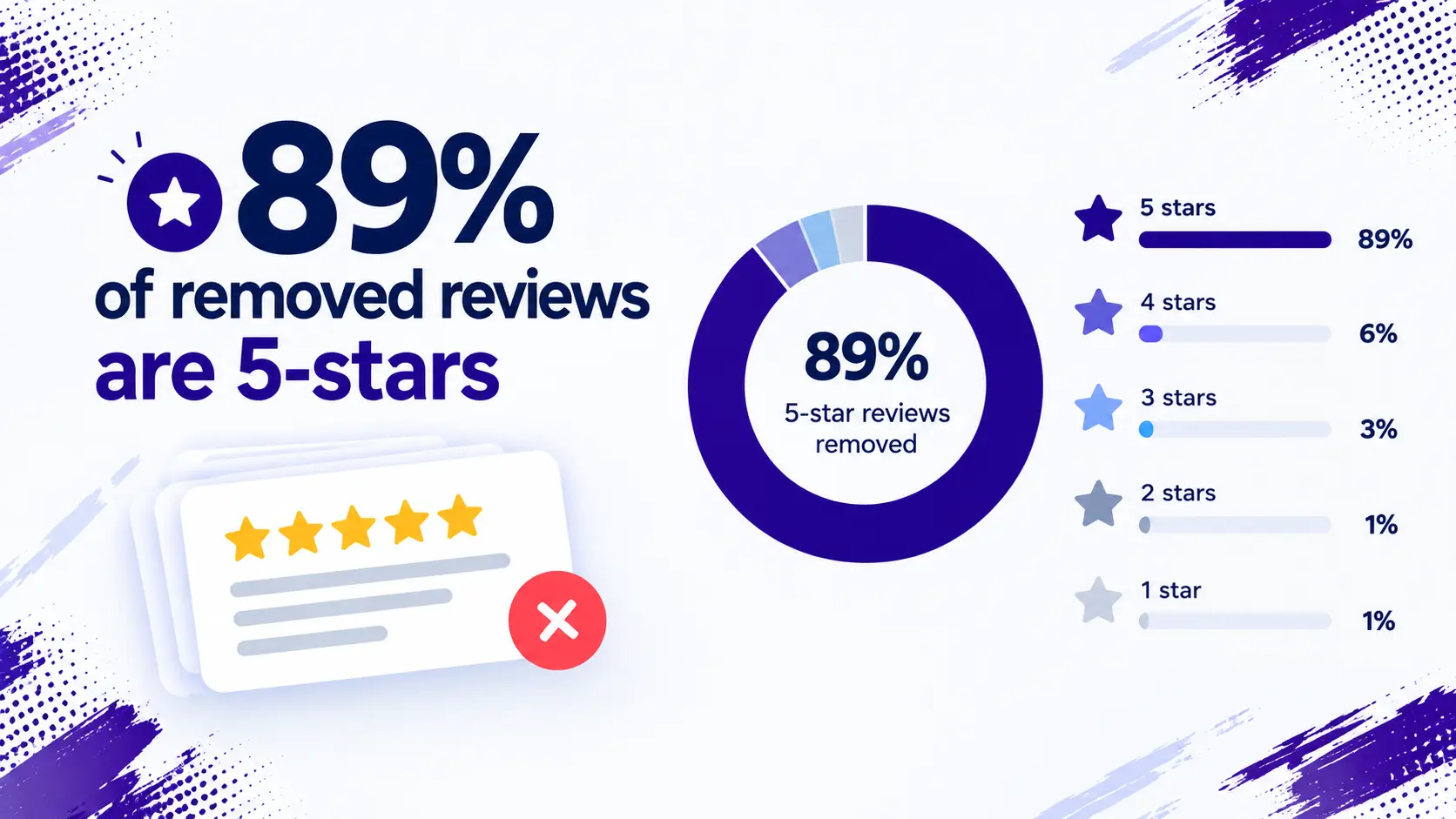
- 89.1% of deleted reviews were 5-star. This is because Google’s AI filters for a large number of positive comments that are posted around the same time, raising concern of being fake reviews.
- Generic phrases are flagged most often. Content that sounds AI-generated or uses very vague language doesn’t seem to rank well with Google’s new filtering and spam-identifying systems.
- Responding does not protect a review. Replying to reviews doesn’t stop Google from removing your reviews if they violate the rules. Around 60.1% of deleted reviews were replied to by the business owners. Google even looks at old reviews; the reviews from the sample had a median duration of 78 days(average 228 days) before getting deleted.
- Most losses are small but in batches. Each individual profile didn’t have that many of their reviews deleted; 63% of profiles lost only 1-5 reviews, but the deletion happened in batches, meaning each profile got impacted several times the same day, with 30% of profiles falling under this category of batch deletion.
- Longer reviews get caught more often. Google seems to flag long reviews as suspicious and delete them, as over 76% of deleted positive reviews had more than 11 words. You need to keep your reviews short and compact.
The best way to avoid your Google reviews getting deleted is to ask customers for specific and detailed reviews while avoiding vague language.
How to get missing reviews back – step-by-step solution.
Submit a missing-review request
- Log in to your Business Account and go to Google’s Business Support Page.
- Go to “Tell us what we can help with?” and write “missing reviews,” and select the “Review Missing” option.
- Complete all the detailed information about your business and the issue you’re facing.
- Click Submit and wait for a response.
The escalation trick
After you’ve used the official Business Support Page to report your missing reviews, you will be sent auto-generated emails keeping you updated. But it usually takes a long time for them to respond. If they don’t give you back your missing reviews, you can use the escalation trick by asking Google Product Experts from the Google community to convey your message to the Google team directly. You can also send Emails to Google asking specifically for a human operator.
The appeal tool (different from a missing-review request)
Google has an official appeal tool to manage appeals for your Google Business Profile. Here’s how you use it:
- Go to the Google Appeal Tool and confirm your email.
- Select the business and click Continue.
- You’ll see the reason for the violation; click on Submit.
- You’ll have a timer of 60 minutes to add evidence as attachments.
- Complete the attachments and click Submit.
What genuinely can’t be recovered
There are some reviews that you cannot get back. Those are:
- Reviews that violate Google’s rules and regulations.
- Reviews from reviewers that have had their accounts disabled.
- Reviews deleted manually by the reviewer.
If nothing works, yet you need a constant Google review flow in your business, you should consult an expert like TheSmmExpert to fix the problem.
“Google support isn’t helping” – setting realistic expectations.
When you’ve used all the official channels to communicate with Google and have not received any information or support, you can visit their Support Communities. These communities have a lot of people who act as volunteers trying to help the community.
They are Google Experts, some with inside connections. You can reach out to them about your issues and find out the root cause. They can even communicate directly with the Google team on your behalf. If that’s still not helpful, you need to start thinking about how to get more proper reviews that will not be taken down by Google.
How to prevent it (and build a profile that absorbs losses)
- Ask every customer, not just the happy ones. When you start review-gating by only acquiring positive reviews from customers, it is marked as spam by Google’s AI spam filter. It’s better to have a constant flow of regular reviews. Learn How to Ask Customers for Google Reviews properly to avoid this issue.
- Encourage specific, detailed reviews. Reviews that have vague language look like spam to filters. Ask your customers to write in detail about their experience with your business.
- Space out your requests. Don’t ask all your customers to review at once; it will create an influx of reviews in a short period of time, causing Google to flag your reviews. Instead, ask at regular intervals.
- Never incentivize. Don’t try to buy reviews from customers or incentivise them using discounts or coupons. These are strictly prohibited.
- Keep your profile accurate and verified. Always make sure your business profile is up to date on any platform or website that it’s on. This will help solve duplicate profile issues.
- Build volume as a buffer. Make sure to have a regular flow of reviews to build the credibility of the business. 50 reviews at 4.6 average stars is better than 2 reviews with 5 stars.
Keep your own dated backup – the evidence system.
It is important to keep your own backup of review data. This can help when a glitch happens or when Google deletes some of your reviews. These will act as proof to Google and other platforms of the existence of these reviews.
You can use review management tools like Birdeye and TrueReview to keep track of your reviews across platforms. These can track your reviews with dates, content, and their attachments. You can also extract Google reviews into your Excel file using tools like Google Takeout. This will help you maintain a spreadsheet for ease of maintaining your review data.
FAQ
Why did my Google reviews suddenly disappear overnight?
Google has advanced AI-driven filters and spam-detecting systems. If some of your reviews look like spam, Google will take them down. It will also take down reviews that violate its new regulatory platform rules.
Will my disappeared Google reviews come back on their own?
Not always. Google takes down reviews they think might be spam or breaking guidelines. These reviews then undergo a verification process, after which, if they are verified, they will be back on their own in the platform.
How long should I wait before contacting Google about missing reviews?
Google can take as long as three days to complete their verification of reviews. If your review has been missing for more than three days, reach out to Google to find out why the review was taken down. If reviews are taken down as spam, it can take as long as 2 weeks to reappear.
Does Google notify you when it removes a review?
No. Google doesn’t notify you when it removes a review. That’s why you need to keep track of your reviews constantly to make sure the accurate numbers and reviews are reflected on your business profile.
Why is Google removing my 5-star reviews specifically?
Google’s AI is specifically trained to detect fake positive reviews and spam. When there is an influx of 5-star reviews in a short period of time, it signals to the AI that it might be spam. So, most removed reviews are 50star reviews.
Do Google reviews expire or fall off over time?
No. Google reviews have no expiry date. Unless the review is taken down due to a policy change, or the review contains content that violates the platform rules, the review will not fall off over time.
Does responding to a review protect it from being deleted?
No. Responding to a review has no effect on keeping the reviews intact. The only way for reviews to stay away from deletion is to make sure the reviews follow the platform guidelines set by Google and regulatory bodies such as the FTC.
Will my star rating drop while reviews are missing?
Yes. If your profile had a large number of positive 5-star reviews that were taken down due to violating Google’s policies, it will significantly lower your star rating. You should ask customers regularly for a steady flow of good reviews to keep a good star rating.
Someone is leaving fake 1-star reviews and demanding money – what do I do?
Do not pay the extortionists. Take screenshots as proof of their conversation with you as well as their reviews, and then appeal to the official channels of Google using this proof. You can also flag these fake reviews as inappropriate, and Google will take them down.
Can I get my reviews back after Google suspended and reinstated my profile?
Yes, you should have your reviews back after a suspension from Google. But if those reviews violate some of Google’s platform rules, they will not be able to pass Google’s AI spam and fake review checker and will be deleted as well.
How do I actually get a human at Google instead of a canned reply?
There is no official channel where you can get a human to interact with you at Google. But if you email them directly asking for a human operator, they might hook you up with one without their automated email replies.
Are my reviews on Yelp or Facebook counted on Google?
No. Google only allows you to show reviews that were posted on Google’s own platform. They do not allow you to copy your reviews and manually post them on Google. This is a serious violation, and Google will take your profile down for it.
Is there anything I can do to make sure this never wipes me out again?
One thing you can do is to get a steady stream of detailed reviews from your customers, not reviews that are vague and have content that violates Google’s review policies. This can ensure your reviews aren’t wiped out again.
How long does a new Google review take to show up?
New reviews can normally take anywhere between an instant and 5-7 days to appear. It depends on the nature of the review as well as the reviewer’s account. If the account or review is suspicious, it’ll undergo a verification process, which can take up to a week.
 Written byAbdul HalimAbdul Halim writes about online reputation management and the challenges businesses face when trying to build trust online. His content covers customer feedback, online reviews, how people see brands, reputation monitoring, negative feedback, and ways to maintain a strong online presence. Abdul shares simple steps businesses can use to learn what customers say, respond to reputation concerns, build credibility, and earn lasting trust. He wants to help people understand reputation management more easily and give businesses ideas for keeping and growing their online reputation.LinkedIn