
Facebook Business Manager, currently known as Business Portfolio, is the backend that controls access to assets such as ad accounts, business pages, pixels, and billing, whereas Meta Business Suite is the frontend workspace for regular activities such as content publishing, boosting content, and replying to messages.
That means the Business Manager owns the assets and Business Suite works on them. These two tools are not competitors; they complement each other to make the marketing campaign better for businesses. They share the same URL and interface but perform different duties. That’s why most people often confuse them. This guide will clear the confusion and show you when to use what.

Meta Business Suite vs Business Manager: A quick comparison
| Feature | Meta Business Suite | Business Manager (Business Portfolio) |
|---|---|---|
| Main purpose | Regular workspace. | Owning assets, permissions, and admin. |
| Best for | Solo creators, small businesses, single marketers. | Marketers, agencies, multi-brand teams, advertisers. |
| Posting & scheduling | Yes – regular posts, Stories, Reels, Planner | No |
| Inbox & community | Yes – unified inbox for different platforms including FB, IG, Messenger, WhatsApp. | No |
| Ads & billing | Basic ads and post boosting. | Owns pages, ad accounts, pixels, catalogs, and billing. |
| Permissions & ownership | Redirects to Business Portfolio | Full control of assets, users, roles, and partners. |
| Mobile app | Yes – iOS and Android | No dedicated app. |
| Cost | Free | Free |
Meta Business Suite vs Business Manager: Detailed Explanation
1. Purpose: workspace vs. control layer
Meta Business Suite works as a workspace for marketers where they can easily perform regular tasks. It answers what I am posting and how the content is performing. The purpose of this tool is to make a smooth interface for all the other FB platforms.
On the other hand, a Business Manager works as a control layer where you can control your assets. It answers who owns the page, ad account, and pixel. It also answers who is allowed to use or touch those assets.
Many people think that having access to a Business Suite allows you to control the account. However, it does not permit you to control the account. You can have permission or control only when you have access to a Business Manager.

2. Content scheduling and publishing
Meta Business Suite helps you deeply for content creation and scheduling. You can post your regular content, including videos, reels, stories, images, and posts, through this tool, draft them, and schedule them as well for future posting. It also allows you to post and schedule on different Meta platforms, including Instagram and Facebook, from a single dashboard.
On the contrary, Business Manager or Business Portfolio does not have such a publishing, drafting, and posting tool. This is a clear difference between these two tools. However, you can use this tool to connect Instagram to the Facebook Page for cross-content publishing.
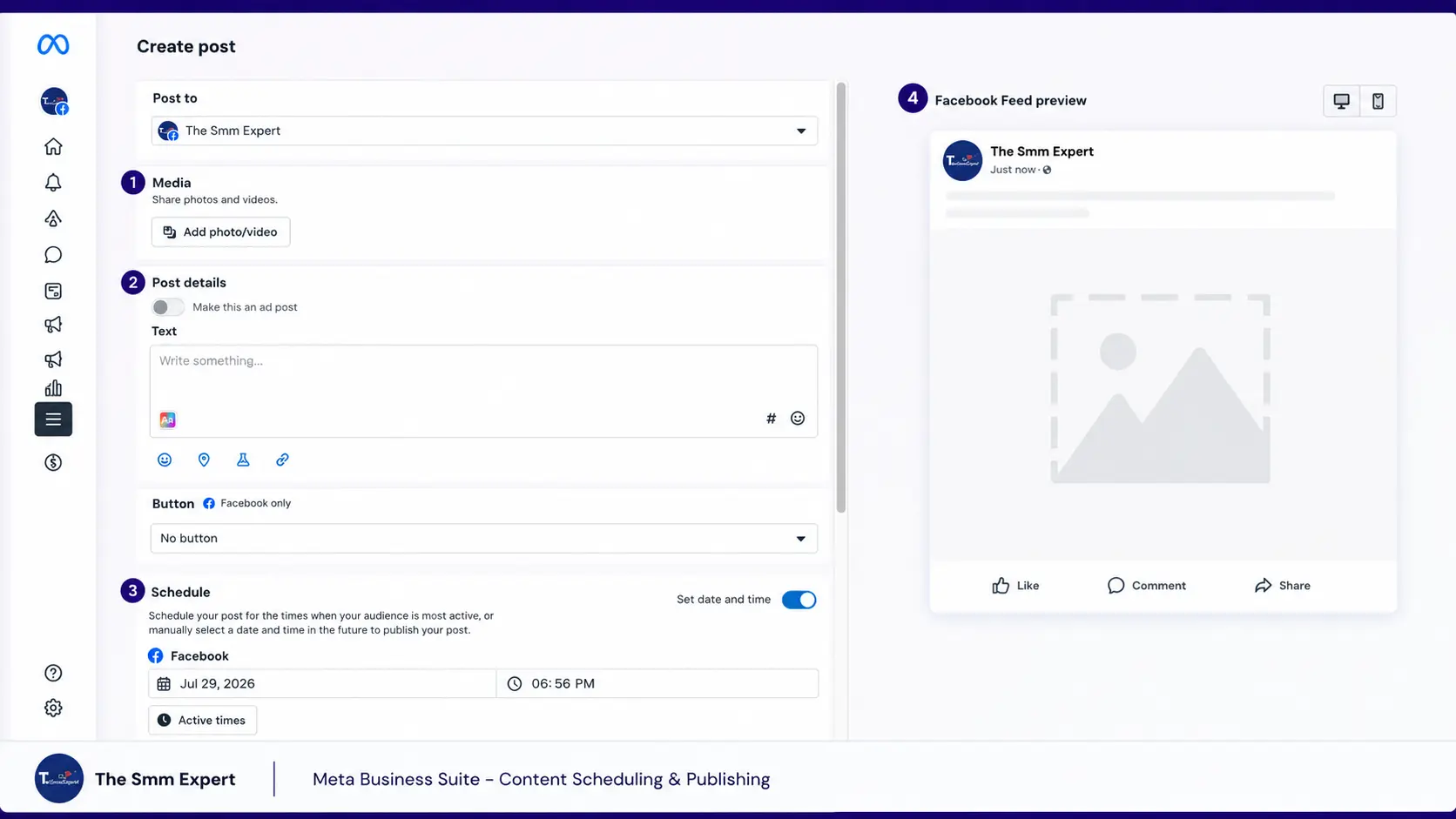
3. Inbox and community management
Meta Business Suite offers users a unified inbox to make messaging and commenting easier. You can pull comments and messages from Instagram, Facebook, Messenger, and WhatsApp Business into the single dashboard to view and manage. Business Portfolio does not have such functions at all.
Business Suite allows you to read and reply to those messages, respond to those comments, set up automated messaging, and filter conversations. But Business Manager is not built for this. Business Suite helps the team communicate through different channels without switching between platforms and wasting time.

4. Ads, pixels, and billing (and where Ads Manager fits)
Business Manager or Business Portfolio control all the assets, including ad accounts, product catalogs, pixels, datasets, and billing. On the other hand, Meta Business Suite does not control anything. It only allows you to create post boosting and basic ads. For serious advertisers, Business Portfolio is mandatory.
You can create and own ad accounts, assign roles, set up supporting assets such as Pixels, Catalogs, and Datasets, and manage billing and invoicing. It allows you to track the performance and target customers for the next campaigns.
Meta Ads Manager comes into play here and works under the Business Portfolio. It offers a dedicated campaign tool where you can set the budget, run A/B testing, get proper reporting, and set advanced targeting.

Setting up ad accounts, catalogs, pixels, and billing properly will save you from costly cleanup lateer when you scale the campaign. You can skip the error and take our Facebook Ad Management service from TheSmmExpert to cover everything. It saves your time while provide old and aged assets for better performance.
5. Permissions, roles, and partner access
As mentioned earlier, Business Manager offers you full control over the partner access, users, and roles. Business Suite cannot set permissions at all. It redirects you to the Business Manager when you try. If you are an agency or freelance ad expert, this changes the game because it allows you to perform your tasks without getting access to your clients’ accounts. Once the task is complete, they can remove you, and your access is completely revoked.

This works better for companies when hiring freelancers or agencies. It allows the brands to grant access to assets without sharing the Facebook login. They can also remove the employees when they leave the company, keeping the company data safe.
This may sound confusing to many people. That’s why brands and marketers buy Facebook Business Manager from us that are old, verified, and high-quality.
6. Mobile app and accessibility
Meta Business Suite comes in a dedicated mobile app on iOS and Android. However, Business Manager does not have such an app, and you can use it from a browser. This is a minor difference, but it clears the confusion. The app allows you to check notifications, boost and publish content, manage your inbox, and check basic insights.
Which one should you use?
Selecting the right tool depends on the task you need to perform. Follow these choosing methods for better functionality.
Use Meta Business Suite if you,
- Are a solo creator, small business, creator, or small marketer.
- Focus on organic content and regular posting, scheduling, and engagement.
- Want a unified inbox for comments and messages across Facebook and Instagram.
- Need to boost the content occasionally.
- Manage your presence from your phone.
Use Business Manager (Business Portfolio) if you,
- Manage multiple ad accounts, Pages, or brands.
- Run regular real ad campaigns for your business and need catalogs, pixels, and billing control.
- Are an agency or work with an agency requiring partner access.
- Need to assign roles for your team.
- Want business assets owned by your business, not your personal profile.
You can check details about Meta Business Manager, their use, and how to create one to have a better understanding.
| I want to | Use |
| Post, schedule, reply to messages/comments. | Business Suite |
| Boost a post. | Business Suite |
| Add/own an ad account, pixel, or catalog. | Business Portfolio |
| Grant access to an agency or teammate. | Business Portfolio |
| Build a real campaign with proper targeting & budget. | Ads Manager |
Most businesses use both to get the best performance from Meta. They use Business Portfolio to set up ownership, access, and billing, and Business Suite to perform regular activities. Since both are free and offer such facilities, it is better to use both, and once you start to use it regularly, you will have no confusion at all.
Do I still need a personal Facebook account?
Yes, you still need to use your personal Facebook account. This is key to accessing your Business Manager and Business Suite. Without the profile, you cannot log in to those tools. And if you deactivate the profile, you can lose access to everything connected to it.
Is Meta Business Manager the same as Meta Business Suite?
No, Meta Business Manager allows you to control the assets, run ads, assign ownership, and others, whereas Meta Business Suite allows you to publish content, schedule posts, and reply to messages.
Did Facebook Business Manager become a Business Portfolio?
Yes. Meta renamed its Business Manager tool to Business Portfolio in 2024. But the interface and functions remain the same.
Do I need Meta Business Suite and Business Portfolio?
Yes, you need both Meta Business Suite and Business Portfolio to enjoy all the benefits Meta offers for marketing. However, you can publish content and answer messages through Business Suite only. The moment you manage multiple assets, run ads, or work with a partner, you will need a Business Manager.
Is Meta Business Suite free?
Yes, you can use Meta Business Suite and its features such as scheduling posts, insights, unified inbox, and more without paying a single penny. However, you need to pay when running ads or marketing campaigns.
Where do I give an agency access to my Meta assets?
You can provide access to your Meta Assets in Business Portfolio by adding the agency as a partner business. Do not share your personal login credentials, and do not assign each asset individually.
Why can’t I access something even though I have “full control”?
You might not have full control over all the assets. Having access or control over an asset does not grant you access to other assets. Check the asset’s permissions and grant access to the asset you want to control.

