
If your Facebook reviews not showing up, they are not deleted for sure, so don’t panic. They may be delayed; your customers might have set the privacy to friends instead of public, or the reviews are hidden by Facebook’s new pages experience.
To solve the problem, you can wait for a few days for the reviews to show up, ask your customers to change the privacy from friends to public, and try some setting changes. If the problem is a Facebook glitch, try Help and Support to get rid of that. This guide will tell you the exact reasons, where to look to find the causes, and how to fix them.
First, what actually changed with Facebook reviews
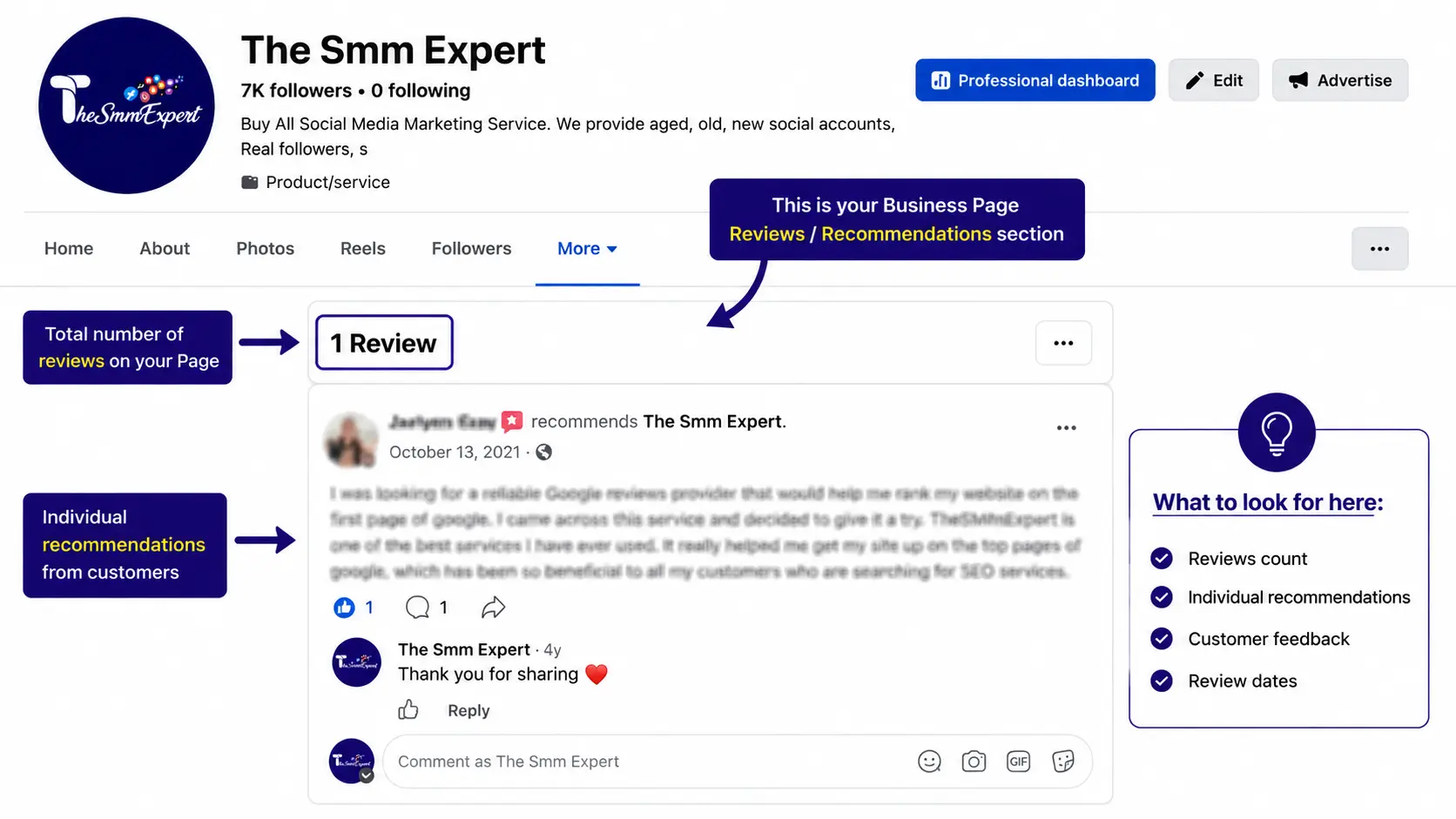
You need to understand the change with Facebook reviews to fix the problem. Star ratings are gone, and your Facebook reviews are now Facebook recommendations. So your customers cannot rate your business. They can only write short comments.
However, you will see ratings on some pages that are basically the estimate Facebook calculates based on the recommendations. The recommendation tab lives under the review tab.
Facebook introduced the New Pages Experience feature that removed the old ‘Templates and Tabs’ features. Once you understand this, it will be easier for you to understand the core problems and solutions.
Part 1: Facebook reviews not showing on your Business Page
Let’s see the main reasons and solutions.
1. Your reviews are just delayed
Facebook does not show the recommendation instantly right after a customer writes one. It is done to ensure content safety, spam filtering, and system caching updates. Your customer might write a recommendation while standing in your store, but it will take some time to show up. However, if you wait 24 hours and it does not show up, something happened.
2. The reviewer set their review to “Friends,” not “Public”
One of the main reasons for reviews not to show is the privacy setting your customer has set. If the customers are sure that they wrote the review but you cannot see it under the review tab, chances are high that they set their privacy to ‘friends’ instead of ‘public’.
Ask your customers to change the privacy since only public reviews will be visible on your business page. They should go to your review tab, find the review, and change the privacy. Politely ask your customers to do so since they are doing you a favor this time.
3. You’re on the New Pages Experience
As mentioned earlier, if you are on the New Page Experience, the page layout has changed. The new page experience has removed the review tab and some pages. It is hidden, and you cannot bring it back through the old toggle.
To solve the problem, open your profile, find the cover photo, and click the ‘more’ dropdown under the photo. Find the Manage Sections option to control which section you want to appear. You will find the Reviews tab there and turn it on to show the reviews.
However, remember that Facebook often changes its interface, and you should verify that.
4. A Facebook bug or glitch
Sometimes, Facebook experiences glitches in its own Reviews section, usually after a layout change. You will see your reviews clearly listed, but the Page will say “0 recommendations” or show a 0.00 rating.
This is a known bug, and your data is not lost. Give it some time, and it will return automatically. You don’t need to do anything here. However, if the problem exists for a long time, report it through Help and Support, and Facebook will resolve the issue.
5. The reviewer deleted their Facebook account
If customers delete their Facebook accounts or if the accounts are banned, all the activities go with that. You cannot do anything about that. Your total recommendation number will drop, and there’s no way to recover that.
6. Your reviews are too old – or too new
Facebook does not show every review a page has gained throughout the years. Old reviews are often hidden to leave places for new and fresh reviews. Your page might have 200 reviews, but it will show like 100 reviews.
Part 2: Facebook reviews not showing on your website
This is a different problem where your reviews are visible on your Facebook page, but they are not showing up on the website. The problem is with the system you are using, not with the Facebook reviews. Here are the potential causes for that.
- You are using the wrong URL. Double-check the entered URL and input the right one.
- Check if reviews are public or not. The widget can only show public reviews.
- See whether you have a strict filter in the widget to hide everything.
- If the reviews are shown but the name and photos are missing, it is a privacy issue with the Facebook profile, and you cannot do anything about that.
- Find CSS conflicts between your theme and widget.
- Clear your cache or check from other devices.
Remember that not all reviews will be displayed on your website that you get from Facebook.
Facebook Reviews Troubleshooting Table
| Symptom | Most likely cause | Fix |
|---|---|---|
| Reviews are not visible even though the customers posted them. | Delay after posting. | Wait up to 24 hours. |
| The customer’s review isn’t visible, but the customer can see it. | Privacy is set to “Friends,” not Public. | Have your customers change to the world icon. |
| The reviews tab is missing. | You are in the New Pages Experience. | Check More > Manage Sections; however, some Pages can’t restore it. |
| I have reviews, but the page shows “0 recommendations. | Common Facebook glitch. | Wait; report through Help and Support. |
| Review count dropped. | The reviewer deleted their account or their account was deleted. | Unrecoverable. |
| Widget says “No reviews found” | Incorrect URL, no public reviews, or filters. | Fix URL, change the privacy, adjust filters. |
| Names/photos blank in widget. | Facebook privacy restriction. | No solution – platform limitation. |
| Embedded reviews look broken. | CSS, cache, or oEmbed problem. | Clear cache, adjust your CSS, enable oEmbed. |
Should you rely on Facebook reviews anymore?
Facebook reviews are unstable and shrinking. Star ratings are not available, and the reviews tab keeps changing. It is always better to have some alternatives. Follow these three moves.
- Take screenshots of your reviews so that a glitch or deleted account cannot remove your social proof.
- Diversify to Google Reviews since it is more stable than Facebook. If you have to choose one review platform, use Google. However, if you are on F-Commerce only, Facebook reviews are the only option for you. You can check our content to understand the differences between Google Reviews and Facebook Reviews. It will help you choose the right one for your business.
- Embed reviews you control on your website through a widget to prevent Facebook from taking away your social proof.
You can also buy some Facebook reviews if your reviews are vanishing constantly. However, make sure to buy original and authentic reviews from original buyers with genuine profiles and regular engagement history. Otherwise, Facebook will delete those fake reviews and penalize your page. Find a good vendor like TheSMMExpert that offers quality and original reviews.
Frequently asked questions
Did Facebook remove reviews?
No, Facebook did not delete reviews. Instead, it replaced the star-rating system with Recommendations.
Why does my Page say “0 recommendations” when I clearly have reviews?
It often happens due to a Facebook display glitch right after the layout change that will be solved automatically after a while.
Why can’t I find the Reviews tab on my Business Page?
Your page might have shifted to the New Pages Experience where the review section is hidden. You can open it from the ‘more’ option under your cover photo.
How long do Facebook reviews take to show up?
It generally takes a few hours to a day, and a few weeks for some new reviews. Facebook checks those reviews for safety, spam, and security.
Can I still get star ratings on Facebook?
No. You cannot get star ratings on Facebook anymore. Customers can recommend your business or not recommend it. However, the star rating will show up from Facebook based on the recommendation number.
How do I get my disappeared Facebook reviews back?
Find out why the reviews are not showing up. It might be a glitch, or the customer might have deleted the reviews or kept the privacy to friends.

