On this page
- Who uses Facebook retargeting ads
- What changes your retargeting results
- How to build your retargeting campaign
- Situations and what to do
- Details that make retargeting work
- When your retargeting ads fail
- Rules you have to follow
- What retargeting actually costs
- Keeping your campaigns running
- When retargeting is the wrong choice
- Frequently asked questions
- Start your first retargeting campaign
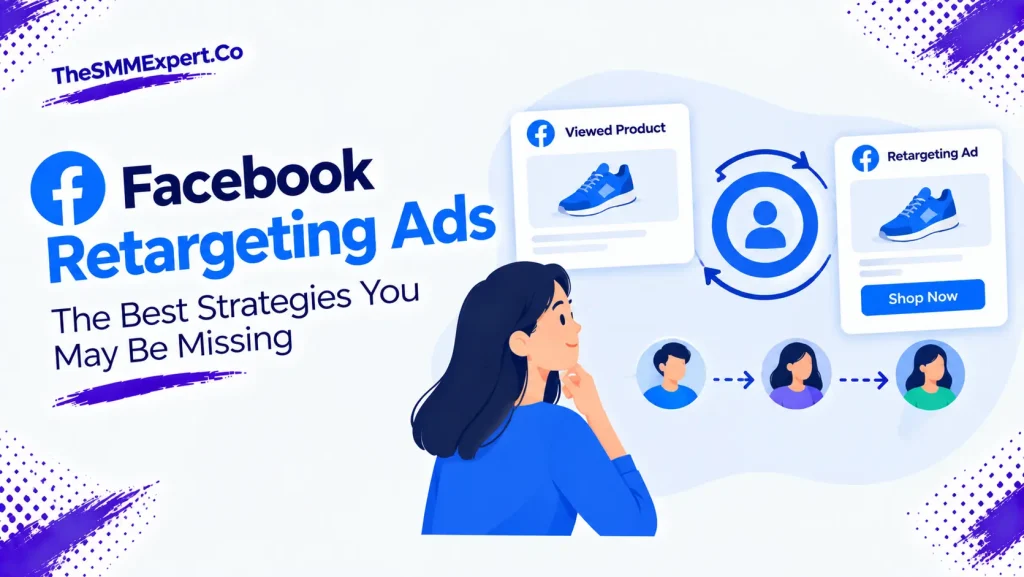
The best facebook retargeting ads strategies you may be missing rely on splitting your audience by how far they got in your funnel. You don’t send the same message to someone who watched a video and someone who left items in their cart. The split matters more than the creative itself. If your audience visited a product page but didn’t buy, show them that exact item with a small discount. If they only read your blog, offer a free guide instead of pushing a sale.
Three things change these numbers for you: your daily ad budget, the size of your website traffic, and how long your sales cycle runs. A shop selling inexpensive shirts needs different timing than a company selling software that’s costly relative to those shirts.
Who uses Facebook retargeting ads
Three different people type this query into a search bar, and they don’t need the same thing. An online store owner usually has 1,000 or more monthly visitors and wants abandoned carts back. They already run basic Meta ads and need tighter audience splits.
A local service business, like a dentist or plumber, gets fewer than 300 site visits a month. They actually need lead forms, not standard retargeting. A marketing agency worker handles five or more client accounts at once. They need templates and naming rules they can copy fast.
This page serves the online store owner or the direct-to-consumer brand running its own Meta Ads Manager account. It assumes you already have the Meta pixel installed on your website and you’re getting at least 500 unique visitors a month. Below that number, your custom audiences stay too small to exit Meta’s learning phase efficiently.
If you run a local service business with low web traffic, skip this page. Go read Meta’s official documentation on lead generation campaigns instead. Retargeting tiny audiences burns money because the platform can’t optimize delivery. The rest of this guide assumes you sell physical products or digital subscriptions directly through a website where the pixel tracks every page load.
What changes your retargeting results
Your audience size decides everything before you even write an ad. Meta requires a minimum of 100 people in a custom audience to serve ads, but campaigns rarely perform well under 1,000 users. If your website gets 500 visitors a week, a 7-day retargeting window gives you about 500 people. That’s too small.
Stretch the window to 30 days so the pool reaches 2,000 or more, giving the algorithm enough data to find buyers. Check your exact audience size inside the Audiences tab in Ads Manager before launching anything.
How you split those people matters more than your image or headline. Grouping everyone who visited your site into one list means everyone sees the same generic message. Separate them by action: page viewers, add-to-carts, and past buyers. If a user added an item to their cart, show them that specific product. If they only viewed a category page, show them a broader brand message. Mixing these groups wastes budget showing cart reminders to people who never picked an item.
The time between their visit and your ad is the factor people get wrong most often. Showing an ad one hour after someone leaves your site feels aggressive and often annoys them. Waiting 14 days means they’ve already bought from a competitor. For cheap impulse items, target days 1 through 3. For considered purchases, start on day 3 and run through day 14. Match the delay to how long your average customer takes to decide.
Your offer must match the depth of their interest. A visitor who bounced off your homepage doesn’t want a 20% discount code yet. They need a reason to trust you, like a short video or a customer review. Save the discount codes for people who reached the checkout page and left. Giving away margins to cold traffic shrinks your profit for no reason.
Finally, frequency caps keep your brand from becoming a nuisance. Without a cap, Meta might show your ad to the same person 10 times in two days. Set a reach objective or monitor your frequency column daily. If it passes 3 in a single week for a small audience, turn the ad set off or expand the audience pool.
How to build your retargeting campaign

Setting up a retargeting campaign in Meta Ads Manager takes about 20 minutes if your pixel is already firing correctly. Follow these steps exactly, checking each result before moving to the next one.
- Open Meta Ads Manager and click the green Create button. Select the Sales objective if you sell products, or Leads if you collect emails. Name your campaign clearly, like “Retargeting – Cart Abandoners – Oct 2026”.
- At the ad set level, scroll down to the Audience section. Click Create New and select Custom Audience. Choose Website as your source. This pulls data directly from your Meta pixel.
- In the events dropdown, select the exact action you want to target. For cart abandoners, choose “AddToCart”. Set the retention window based on your product price: 3 days for inexpensive items, or 14 days for items that are costly relative to them. Click Create Audience.
- Still in the ad set, exclude people who already finished the action. Create another Custom Audience using the “Purchase” event for the last 30 days, then add it to the Exclude box. This stops you from paying to show ads to recent buyers.
- Set your budget. Start with an amount that’s inexpensive relative to the alternative for audiences under 5,000 people. If your audience is larger than 10,000, you can safely spend more. Let the ad set run for 72 hours without touching it so the algorithm stabilizes.
- Move to the ad level. Choose Dynamic Creative if you’re retargeting specific products from your catalog. If you’re using a static image, upload a picture of the exact product the user looked at, not a generic brand logo.
- Write your primary text to address why they left. Mention shipping costs, return policies, or limited stock. Keep it under 125 characters so it doesn’t hide behind the “See More” button on mobile screens.
- Publish the campaign and go to your Columns menu. Add the Frequency and Cost Per Result metrics to your dashboard so you can track them immediately.
The single judgment call that separates a working campaign from a wasted one is knowing when to turn it off. If your cost per purchase stays above your profit margin after spending three times your target cost, the audience is too small or the offer isn’t strong enough.
Pause the ad set rather than letting it drain your account. If you need to alter the pixel code itself to track new events, hire a developer; editing base code incorrectly breaks tracking for every campaign you run.
Situations and what to do
Different visitor actions require completely different follow-up messages and budgets. Here is how to handle the cases you’ll actually see in your pixel data.
| Visitor action | Ad content to use | Daily budget needed | Watch out for |
|---|---|---|---|
| Viewed homepage only | Brand story or top reviews | $10 – $15 | High bounce rates |
| Read blog posts | Lead magnet or email signup | $10 – $20 | Low purchase intent |
| Viewed product page | Dynamic product catalog image | $15 – $30 | Out of stock items |
| Added item to cart | Direct discount or free shipping | $20 – $50 | Margin loss on discounts |
| Started checkout process | Urgency message about stock | $20 – $50 | Payment gateway errors |
| Bought in last 30 days | Cross-sell related accessories | $10 – $20 | Annoying recent buyers |
Match the row to the custom audience you built in step 3. Don’t mix rows together in one ad set, or your message won’t fit anyone perfectly.
Details that make retargeting work

Setting up the pixel correctly
A broken pixel sends your budget to the wrong people. Install the Meta Pixel Helper Chrome extension and visit your own website. Click the extension icon and verify that the “PageView” event fires green on every single page. Then add an item to your cart and check that the “AddToCart” event fires with the correct currency and value parameters.
If the value shows as zero or the currency defaults to USD when you sell in Euros, your dynamic ads will display the wrong prices. Fix this in your website’s code before spending any money. You can’t optimize for purchases if Meta doesn’t know what a purchase looks like on your site.
Picking the right creative format
Static images work fine for simple offers, but carousel ads generate higher click-through rates for e-commerce stores with multiple products. Use this feature if you have more than 10 products.
While Meta no longer penalizes images based on text volume, ads with minimal text generally perform better because they look less cluttered in the feed. Test a clean product photo against a graphic with a headline. Run both for 48 hours on a $10 daily budget and compare the cost per click in Ads Manager before scaling the winner.
When your retargeting ads fail
Use this table to match the warning sign in your Ads Manager dashboard to the actual fix. Don’t guess; check the metric first.
| What you notice | What it usually means | What to do first | How to stop it happening again |
|---|---|---|---|
| Frequency is over 4.0 | Audience is too small | Expand retention days to 30 | Increase website traffic sources |
| Cost per click is high | Creative fatigue or bad offer | Swap the image and headline | Rotate new creatives every 14 days |
| Clicks but zero sales | Landing page loads slowly | Check mobile page speed | Optimize images before uploading |
| Ads aren’t delivering | Audience under 100 people | Combine similar audience segments | Stop targeting micro-segments |
| Purchases are unprofitable | Discount was too large | Lower the offer to 10% | Calculate margins before launching |
| Pixel shows zero events | Tracking code was removed | Reinstall the base pixel code | Lock website code access permissions |
If your landing page takes more than 3 seconds to load on a 4G mobile connection, you’re paying for clicks that bounce before the screen finishes rendering. Test your URL on PageSpeed Insights before blaming the ad.
Rules you have to follow
Meta enforces strict policies on what you can say and who you can target. You can’t use retargeting to promote prohibited content like tobacco, weapons, or payday loans. Check Meta’s Advertising Standards page directly for the full list, as violating these rules gets your ad account permanently disabled without a warning.
Privacy laws also dictate how you handle data. Under the European Union’s General Data Protection Regulation (GDPR), you must obtain clear consent before dropping cookies or firing pixels on visitors from Europe. If you don’t use a cookie consent banner that blocks the pixel until accepted, you’re breaking the law. The California Consumer Privacy Act (CCPA) requires similar disclosures for residents of California.
You also can’t retarget people based on sensitive characteristics. Meta removed detailed targeting options related to health, race, religion, and sexual orientation. If your custom audience relies on pixel events tied to sensitive health pages, you risk policy violations. Stick to commercial actions like adding items to a cart or viewing pricing pages.
Always ensure your privacy policy explicitly states that you use third-party tracking pixels for advertising. Link this policy in your website footer. Failing to disclose this leaves you open to regulatory fines depending on your country’s specific data protection authority.
What retargeting actually costs
Retargeting is generally cheaper than prospecting because the audience already knows your brand. Expect to pay an amount that’s inexpensive relative to the alternative for e-commerce retargeting in the US market, assuming your audience size is over 5,000 people. If your audience drops below 1,000, that cost per click often doubles because Meta struggles to find available ad inventory for such a tight group.
The real cost you should watch is the cost per acquisition (CPA). Calculate your maximum CPA before you launch. If your product sells for $100 and your profit margin is $40, your CPA must stay below $40 to make money. Factor in the discount you’re offering in the ad. If you give 15% off, your margin drops to $25, meaning your allowable ad spend shrinks significantly.
Time is another hidden expense. Building audiences, writing copy, designing images, and monitoring frequency caps takes about 3 to 5 hours a week for a single campaign. If you manage multiple funnels, that time adds up fast. Compare this effort against your hourly rate. Sometimes hiring a freelancer to manage the technical setup saves you more money than doing it yourself poorly.
Budgets also fluctuate seasonally. During November and December, CPMs (cost per 1,000 impressions) rise sharply across Meta because major brands flood the auction. Your usual click might cost significantly more during Black Friday week. Plan your quarterly budgets around these known spikes rather than assuming January costs apply year-round.
Keeping your campaigns running
Once your ads are live, the work shifts from building to maintaining. Don’t walk away after publishing. Check your frequency metric every 48 hours. If it climbs past 3.0 within a single week, your audience is seeing the same ad too often and developing banner blindness.
Swap out the primary image or video when frequency gets too high. You don’t need to rebuild the entire campaign or reset the pixel. Just duplicate the ad, change the creative file, and turn off the old one. This keeps your optimization history intact while refreshing the visual experience for the user.
Monitor your link click-through rate (CTR). A healthy retargeting CTR sits between 1.5% and 3.0%. If yours drops below 1.0%, your offer no longer appeals to the people in that audience segment. Review your landing page to ensure the price and availability match what the ad promises.
Keep your exclusion lists accurate by ensuring the custom audience of people who purchased in the last 30 days remains applied to your ad sets. If you forget to apply this exclusion when building the ad set, you’ll waste money showing cart abandonment ads to customers who already received their orders. Nothing destroys brand trust faster than begging someone to buy something they’re currently using.
When retargeting is the wrong choice

Retargeting fails completely when your website lacks consistent traffic. If you get fewer than 300 unique visitors a month, your custom audiences will never reach the 1,000-user threshold needed for Meta’s algorithm to optimize delivery. Spend your budget on broad prospecting campaigns or search engine ads instead, focusing on driving initial traffic before trying to capture it again.
It’s also the wrong tool for brand-new products with no historical data. If nobody has clicked your product page yet, there’s no one to retarget. Launch a video view campaign first to build an audience of engaged users. Once 5,000 people have watched 50% of your video, create a custom audience from those viewers and retarget them with a sales offer.
Highly regulated industries face strict limits here. If you sell medical devices or financial services, privacy laws often prevent you from tracking users across sites based on their health or financial inquiries. Consult a legal professional specializing in digital advertising compliance before turning on the pixel. Guessing at privacy boundaries risks massive fines.
Finally, if your profit margin per item is small relative to the alternative, paid retargeting rarely makes mathematical sense unless your repeat purchase rate is exceptionally high. Focus on email marketing for low-margin goods instead, since sending an automated abandoned cart email costs almost nothing compared to paying Meta for every impression.
Frequently asked questions
How long should I run a retargeting ad?
Run it for 3 to 14 days after the user’s visit, depending on your product price. For inexpensive items, target days 1 through 3. For products that are costly relative to them, start on day 3 and run through day 14. Check your average time-to-purchase in your analytics platform to pick the exact window.
Can I retarget people who watched my videos?
Yes, you can build a custom audience based on video engagement. Go to Custom Audiences, select Video, and choose a threshold like 50% or 75% watched. This works well for filling the top of your funnel before asking for a sale.
Why are my retargeting ads not delivering?
Your audience is likely under 100 people, which is Meta’s minimum requirement for ad delivery. Check the audience size estimate on the right side of the ad set screen. If it’s too small, increase the retention window from 7 days to 30 days to capture more users.
Is it safe to offer discounts in retargeting?
It’s safe, but it hurts your profit margins if applied too broadly. Only offer discounts to users who reached the checkout page and abandoned their cart. Don’t give discounts to homepage bouncers, or you’ll train visitors to wait for coupons before buying anything.
What happens if I don’t exclude past buyers?
You’ll waste money showing ads to people who already own the product. Worse, you might annoy them enough to request a refund or leave a negative review. Always build a 30-day purchaser custom audience and place it in the exclusion field of every ad set.
Does the Meta pixel slow down my website?
The base pixel code is lightweight and loads asynchronously, so it shouldn’t noticeably impact page speed. However, if you install multiple third-party tracking tags alongside it, total script weight increases. Test your site speed with and without the tags enabled to measure the actual difference.
How much should I spend per day?
Spend an amount that’s inexpensive relative to the alternative for audiences under 5,000 people. If your audience exceeds 10,000 users, increase the budget accordingly. Spending too little on a large audience prevents the algorithm from gathering enough conversion data to optimize effectively.
Can I use retargeting for B2B services?
Yes, but the timeline changes drastically. B2B sales cycles often take 30 to 90 days. Extend your retention windows to 60 or 90 days, and change the ad content from direct sales pitches to case studies, whitepapers, or webinar invitations that nurture the lead slowly.
Start your first retargeting campaign
Open Ads Manager today and build a single custom audience of people who added items to their cart in the last 7 days. Exclude anyone who purchased in the last 30 days, attach a dynamic product ad, and launch the campaign. Monitor your cost per purchase over the next few days to confirm the setup works before scaling further.
 Written byMatthew WilliamsMatthew Williams is a digital marketing writer and social media expert with over 8 years of experience. He works with Facebook, Gmail, and online reputation problems. He writes clear, useful content to help people, creators, and businesses fix Facebook problems, keep their pages safe, and use Meta’s tools more effectively. His work talks about Facebook Ads, Business Manager, keeping your pages safe, growing your audience.