On this page
- Key Takeaways
- What Are Meta Lead Ads?
- Should You Use Instant Forms?
- How Do Leads Actually Arrive?
- Campaign Setup Checklist
- Form Fields That Qualify
- Targeting, Budgets, And Bids
- Creative That Converts
- Follow-Up And CRM Handoff
- Tracking And Compliance Basics
- Troubleshooting Weak Results
- Frequently Asked Questions
- Conclusion
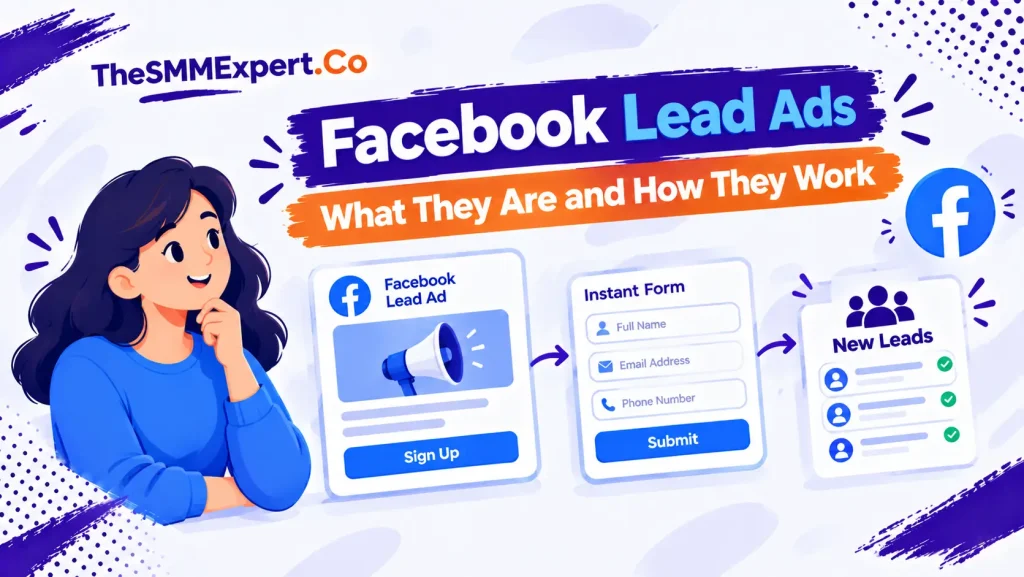
If you searched for facebook lead ads, you’re probably trying to collect prospects without sending people to a slow landing page or asking them to type the same contact details again. The short version: Meta lead ads let people submit an in-app form on Facebook or Instagram, often with fields like name, email, and phone prefilled, so you can capture leads faster and follow up through your sales or marketing system.
Key Takeaways
- Instant forms work best when your offer is clear: consultations, quotes, demos, downloads, coupons, waitlists, or appointment requests.
- Add qualifying questions such as budget range, ZIP code, service needed, company size, or timeline to reduce low-intent leads.
- Connect leads quickly to HubSpot, Salesforce, Mailchimp, Google Sheets, Zapier, Make, or your CRM so no one waits for a manual CSV download.
- Test higher-intent forms against more-volume forms; the extra review step can reduce junk submissions.
- Plan your first budget around cost per lead, not clicks, and judge quality by booked calls, quotes, sales, or revenue.
What Are Meta Lead Ads?
Meta lead ads are paid ads that open an instant form inside Facebook or Instagram instead of sending the person to your website. The form can ask for contact details, custom answers, appointment preferences, and consent. After submission, the lead can be downloaded, sent to a CRM, assigned to a salesperson, or added to an email sequence.
They’re useful because they remove friction. A mobile user doesn’t need to wait for a landing page, pinch and zoom, or type every detail from scratch. For local services, education programs, B2B demos, insurance quotes, auto dealers, gyms, salons, real estate agents, and event organizers, that shorter path can create more inquiries from the same traffic.
The tradeoff is lead quality. Easy forms can attract casual taps, mistaken submissions, or people who forgot what they clicked. That’s why the form, offer, targeting, and follow-up matter as much as the ad itself.
Common lead ad offers include:
- Free quote for HVAC, roofing, landscaping, moving, or pest control
- Consultation call for legal, financial, marketing, or coaching services
- Demo request for SaaS, equipment, software, or B2B services
- Coupon or deal for restaurants, med spas, gyms, dentists, or retailers
- Brochure download for colleges, senior living, franchises, or real estate
- Event registration for webinars, open houses, workshops, or product launches
Should You Use Instant Forms?

Instant forms are a strong choice when speed and convenience matter more than long-form education. They aren’t always better than landing pages, though. If your offer needs pricing tables, proof, product comparisons, financing details, or long explanations, a website funnel may produce fewer but better-informed leads.
Use the table below to choose the right path before you spend money.
| Option | Best for | Watch out for |
|---|---|---|
| Instant form | Quotes, bookings, coupons, demos, event signups | Can bring casual or accidental leads |
| Website form | Complex offers, long sales pages, ecommerce, pricing pages | Slower load times can reduce submissions |
| Messenger lead flow | Restaurants, salons, coaches, local services | Requires fast chat handling |
| Call ad | Emergency services, legal intake, home repairs | Missed calls waste budget |
| App form | Mobile apps, subscriptions, fintech, delivery services | Needs clean app tracking |
Choose instant forms when:
- Your salesperson can respond by phone, SMS, or email the same day
- The buyer already understands the category, such as “get a roof estimate”
- You can qualify with two to five direct questions
- Your CRM can capture leads automatically
- Your offer is simple enough to explain in one ad and one form
Choose a landing page when:
- You need testimonials, case examples, menus, calculators, or galleries
- Your product has several plans, prices, or eligibility rules
- You rely on search intent, SEO pages, or detailed comparison content
- Your legal or compliance team needs more disclosure space
Pro Tip: If you’re unsure, run the same offer two ways: one instant form and one landing page form. Compare not only cost per lead, but also appointment rate, show-up rate, close rate, and average order value.
How Do Leads Actually Arrive?
A person sees your ad in Facebook Feed, Instagram Feed, Stories, Reels, Marketplace, or another eligible Meta placement. They tap the call-to-action button, such as “Sign Up,” “Get Quote,” “Learn More,” or “Book Now.” Instead of leaving the app, they see your lead form.
A basic lead flow looks like this:
- The person taps the ad.
- The instant form opens with your intro, offer, and questions.
- Meta may prefill fields like name, email, or phone from the user’s account.
- The person reviews and submits the form.
- The lead appears in Meta’s lead tools or your connected CRM.
- Your team follows up by phone, email, SMS, or automation.
- You mark the outcome in your CRM: booked, quoted, lost, sold, or nurtured.
That last part is where many campaigns fail. A low cost per lead looks good in Ads Manager, but it doesn’t pay bills unless the lead becomes a real conversation. Build your process around sales handoff, not just form submission.
You can receive leads through:
- Meta Business Suite or the Leads Center
- CSV downloads from your Page or Ads Manager tools
- CRM integrations such as HubSpot, Salesforce, Zoho, Mailchimp, or Keap
- Automation platforms like Zapier, Make, LeadsBridge, or Workato
- Webhooks or API connections built by your developer
Manual downloads are acceptable for a tiny test, but they’re risky for active campaigns. If leads sit untouched for hours or days, the person may forget the ad, book with a competitor, or ignore your call.
Campaign Setup Checklist
Before you build the campaign, prepare the assets. You need a Facebook Page, ad account access, payment method, privacy policy URL, creative, offer, form questions, and a follow-up owner. If an agency or freelancer is helping, confirm permissions in Meta Business Manager before launch day.
| Step | Where it happens | Decision to make |
|---|---|---|
| 1. Choose objective | Ads Manager campaign level | Select Leads as the campaign objective |
| 2. Pick conversion location | Ad set level | Use Instant Forms, calls, Messenger, or website |
| 3. Set audience | Ad set level | Choose location, age, interests, custom audiences, or broad targeting |
| 4. Set budget | Ad set level or campaign level | Start with daily or lifetime budget |
| 5. Build creative | Ad level | Add image, video, copy, headline, and CTA |
| 6. Create form | Ad level | Choose more volume or higher intent |
| 7. Add privacy link | Form settings | Use your live privacy policy URL |
| 8. Connect CRM | Integration settings | Send leads to HubSpot, Salesforce, Zapier, or another tool |
| 9. Test submission | Preview or test tool | Confirm fields, notifications, and routing |
| 10. Launch and monitor | Ads Manager | Review delivery, cost, lead quality, and comments |
The most important setup choice is the form type:
- More volume: fewer steps, easier to submit, usually more leads
- Higher intent: includes a review screen, often better for quotes, demos, and sales calls
- Custom form questions: adds qualification, such as budget, city, service type, or timeline
Pro Tip: Do a real test lead before spending. Submit the form yourself, check the CRM record, confirm the email notification, verify the salesperson assignment, and make sure the thank-you screen points to the right next action.
Form Fields That Qualify
A good form does two jobs: it captures contact details and filters for fit. Keep it short enough to complete on a phone, but specific enough to help your team prioritize. The best fields depend on the business model.
Useful contact fields include:
- Full name
- Email address
- Mobile phone
- ZIP code
- City
- Company name
- Job title
Useful qualifying questions include:
- “What service do you need?” with options like roof repair, new roof, gutters, or inspection
- “When do you want to start?” with options like this week, this month, next quarter, or just researching
- “What is your estimated budget?” with ranges such as $500–$1,000 or $5,000–$10,000
- “How many employees do you have?” for B2B software, payroll, HR, or benefits offers
- “Which location do you prefer?” for gyms, clinics, schools, restaurants, or franchises
Avoid open-ended questions unless a human truly needs the answer. Multiple-choice questions are faster, cleaner in a CRM, and easier to segment. For example, a home services company can route “emergency repair” to phone follow-up and “planning a remodel” to an email sequence.
Your thank-you screen should tell the person what happens next. Instead of “Thanks,” use a specific next step: “A project coordinator will call you,” “Check your email for the guide,” or “Book your appointment on the next page.” Add a button for website visit, calendar booking, phone call, or downloadable resource.
Targeting, Budgets, And Bids
Targeting depends on whether Meta already has enough conversion signals. For a new account, start with a clear geographic area, age range if relevant, and one or two audience concepts. For an account with past leads or customer lists, test lookalikes, retargeting, and broader audiences.
Common audience options include:
- Local radius around cities like Austin, Phoenix, Tampa, or Denver
- Customer list from Shopify, Salesforce, HubSpot, or Square
- Website visitors from the Meta Pixel
- Video viewers from Facebook or Instagram
- Engaged Instagram profile visitors
- Lookalike audience based on paying customers
- Broad audience with location and age only
Budget should be large enough to generate learning, but not so large that you burn money before the form proves itself. Many small businesses start with a daily test in the $20–$100 range. Local service leads might land in the $10–$80 range, simple newsletter or coupon leads in the $1–$15 range, and B2B demo leads in the $30–$250 range. Those are planning ranges, not promises.
Judge performance by funnel math:
- Cost per lead
- Contact rate
- Appointment rate
- Show-up rate
- Quote rate
- Close rate
- Revenue per lead
- Refunds, cancellations, or no-shows
If lead quality is weak, don’t only narrow the audience. First improve the form, offer, and follow-up. Overly narrow targeting can raise costs and limit delivery, while a stronger form can filter intent without starving the campaign.
Creative That Converts
The ad must make the form feel worth completing. Strong creative says who the offer is for, what they get, and what happens after they submit. A vague “Learn more today” ad often produces vague leads.
Use specific creative such as:
- A dentist showing “New patient cleaning and exam”
- A roofer showing storm damage before-and-after photos
- A SaaS brand showing a 30-second dashboard demo
- A gym showing “7-day trial at our Midtown location”
- A realtor showing “Get the list of homes under $450,000”
- A college showing “Request the nursing program brochure”
- A med spa showing “Book a Botox consultation”
Good copy answers these questions quickly:
- Who is this for?
- What problem does it solve?
- What will I receive?
- How long will follow-up take?
- Is there a cost, obligation, or eligibility requirement?
Test at least three creative angles: problem-focused, offer-focused, and proof-focused. A landscaping company might test “Tired of patchy grass?”, “Get a free yard estimate,” and “Serving 500+ local homeowners.” A B2B software company might test pain point, demo, and comparison angles.
Pro Tip: Match the ad language to the form language. If the ad says “free estimate,” the form headline should say “Request your free estimate,” not “Contact us.” That small consistency helps people remember why they tapped.
Follow-Up And CRM Handoff
The follow-up process should be built before launch, not after leads start arriving. Assign one owner for every lead source, define the first response, and decide when a lead becomes disqualified. If three salespeople all think someone else is calling, your campaign will look worse than it is.
A simple lead response plan:
- Send an instant email confirming the request
- Send an SMS if the person agreed to texts
- Call during business hours
- Leave a voicemail with the business name and reason for calling
- Add no-answer leads to a three- to seven-day nurture sequence
- Mark outcomes in the CRM: contacted, booked, no answer, unqualified, won, lost
Useful CRM fields include lead source, campaign name, ad name, form name, service requested, location, budget range, timeline, salesperson, and outcome. Those fields let you compare “Roof Repair Form A” against “Roof Replacement Form B” instead of guessing.
For many teams, the best stack is simple: Meta lead form to Zapier or Make, then into HubSpot, Salesforce, Zoho, Pipedrive, or Google Sheets. If you sell appointments, connect Calendly, Chili Piper, Acuity Scheduling, or your call center software. The goal is fast routing with no copy-and-paste.
Tracking And Compliance Basics
Lead ads need clean tracking even though the form lives inside Meta. At minimum, use consistent campaign names, form names, UTM parameters for thank-you page clicks, CRM source fields, and offline outcome tracking. If you only measure submissions, Ads Manager can’t tell you which leads became customers.
Compliance matters because you’re collecting personal information. Your form should include a privacy policy link, truthful offer language, accurate business identity, and consent wording for email, calls, or texts when required. In the United States, commercial email messages must follow rules such as avoiding deceptive headers, identifying ads when required, and providing an opt-out method; the FTC CAN-SPAM guidance explains those requirements for businesses.
For calls and SMS, talk with counsel or a qualified compliance professional about TCPA, state privacy laws, industry rules, and consent records. This is especially important for insurance, lending, healthcare, education, real estate, employment, and financial services.
Keep records of:
- Form version
- Consent language
- Privacy policy URL
- Submission timestamp
- Lead source
- Follow-up messages
- Opt-out requests
- Sales outcome
Good compliance also improves trust. People are more likely to answer when your confirmation email, caller ID, SMS, and landing page all use the same business name.
Troubleshooting Weak Results
When a campaign disappoints, diagnose the whole funnel. A bad cost per lead can come from weak creative, a confusing offer, a narrow audience, or poor delivery. Bad sales results can come from slow follow-up, unqualified traffic, missing phone numbers, or a mismatch between the ad promise and the actual sales call.
| Problem | Likely cause | Fix |
|---|---|---|
| Many leads, few answers | People forgot the ad or expected email only | Add clearer thank-you text and call faster |
| Cheap but junk leads | Form is too easy or offer is too broad | Use higher-intent form and add qualifying questions |
| High cost per lead | Audience too narrow or creative weak | Test broader audience and new images or videos |
| No delivery | Budget too low, audience too small, or policy issue | Expand targeting and review ad status |
| Leads missing in CRM | Integration failed or field mapping changed | Test the connector and remap fields |
| Sales team rejects leads | Wrong expectations or missing qualification | Add budget, location, service, or timeline fields |
| Good leads, low close rate | Offer, pricing, or sales script mismatch | Review call recordings and update the pitch |
Fix one variable at a time. If you change audience, creative, form, budget, and follow-up on the same day, you won’t know what helped.
A practical seven-day cleanup plan:
- Day 1: Check CRM delivery and lead notifications
- Day 2: Read every form answer and sales note
- Day 3: Add one or two qualification questions
- Day 4: Replace the weakest ad image or video
- Day 5: Test a higher-intent form
- Day 6: Review contact rate by salesperson
- Day 7: Pause ads that produce no booked calls or revenue
The best optimization metric isn’t always cost per lead. For a dentist, booked appointment cost may matter more. For a SaaS company, qualified demo cost matters more. For a roofer, cost per inspected property may matter more. Name the business outcome first, then tune the campaign toward that outcome.
Frequently Asked Questions
How much do Meta lead ads cost?
Costs vary by industry, location, competition, offer, and lead quality. Simple consumer offers can start around $1–$15 per lead, local service quotes often fall around $10–$80, and B2B demos can range from $30–$250 or more. Use these as planning ranges, then judge by booked calls, sales, and revenue.
Are lead ads better than landing pages?
They’re better when the offer is simple and mobile convenience matters. Landing pages are often better for complex products, detailed pricing, galleries, testimonials, calculators, or compliance disclosures. Many advertisers should test both: an instant form for speed and a landing page for deeper education.
How do I download leads from Meta?
You can access leads through Meta Business Suite, Leads Center, Ads Manager tools, or your Facebook Page’s publishing and form tools, depending on your account setup. For active campaigns, connect a CRM integration instead of relying on downloads, so salespeople receive leads quickly and field mapping stays consistent.
Why are my leads low quality?
Low quality usually comes from broad offers, too few questions, slow follow-up, or a mismatch between the ad and the form. Add a higher-intent review step, ask about budget or timeline, clarify the offer, and track which ads produce booked appointments or purchases rather than only submissions.
Can I run lead ads on Instagram?
Yes. Meta lead campaigns can appear on Instagram placements when your account, creative, objective, and placement settings allow it. Make sure vertical creative works in Stories and Reels, the form is mobile-friendly, and your follow-up message references the same offer shown in the Instagram ad.
Conclusion
Start by choosing one clear offer, one audience, and one form with only the fields your sales team truly needs. Launch small, test the full CRM handoff, and review lead quality within the first week. Once you know which form produces real conversations, scale the budget and build more creative around that winning angle.
 Written byMatthew WilliamsMatthew Williams is a digital marketing writer and social media expert with over 8 years of experience. He works with Facebook, Gmail, and online reputation problems. He writes clear, useful content to help people, creators, and businesses fix Facebook problems, keep their pages safe, and use Meta’s tools more effectively. His work talks about Facebook Ads, Business Manager, keeping your pages safe, growing your audience.