On this page
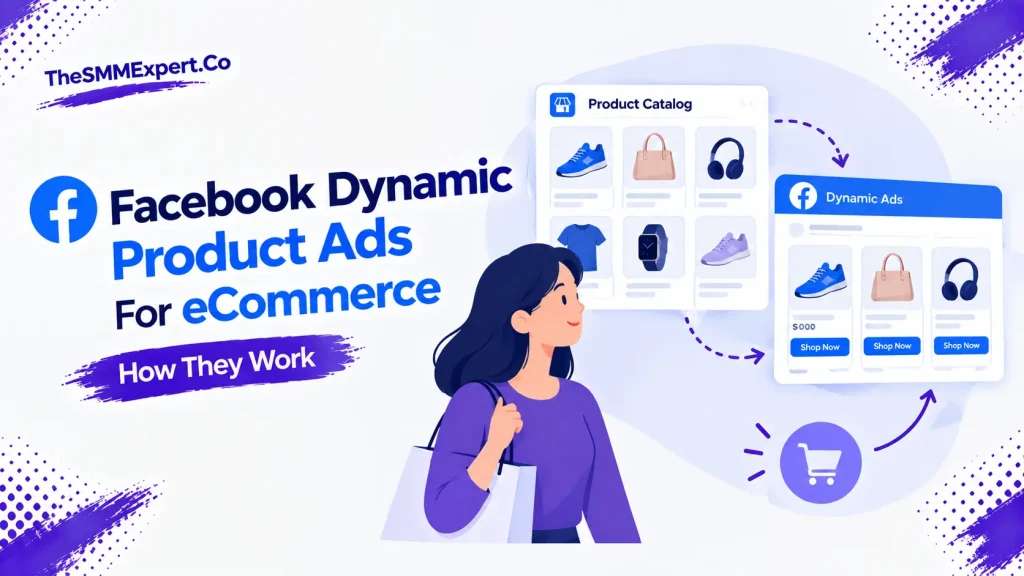
Facebook dynamic product ads for ecommerce automatically show shoppers the products most relevant to their browsing, cart, and purchase activity. They can recover abandoned carts, introduce related products, and scale personalized campaigns without creating one ad for every item in your catalog.
Key Takeaways

- Install the Meta Pixel and Conversions API before launching so Meta can match product views, carts, and purchases to catalog items.
- Build a clean product catalog with accurate IDs, prices, availability, product URLs, and images.
- Start with separate audiences for retargeting and prospecting rather than combining every shopper into one campaign.
- Exclude recent purchasers from cart and product-view campaigns when the goal is acquisition or recovery.
- Judge performance using incremental profit, not return on ad spend alone.
- Check event matching, catalog diagnostics, and landing pages before increasing the budget.
What Dynamic Ads Do
Dynamic product ads, now commonly managed through Meta’s catalog and sales campaign tools, match products to people based on signals such as website activity, app activity, catalog engagement, and prior purchases. The system selects products from your catalog and fills the creative automatically.
For example, a shopper who views a black running shoe may later see that shoe, a different size option, or a related pair of socks. Someone who adds a coffee grinder to a cart may see the grinder again, a compatible filter, or a bundle.
Common ecommerce uses include:
- Viewed-product retargeting for shoppers who visited product pages
- Cart recovery for people who added items but didn’t purchase
- Cross-selling to recent customers
- Upselling with higher-value products or bundles
- Broad prospecting using catalog products to find likely buyers
Dynamic ads aren’t simply a feed of products shown randomly. Their performance depends on the quality of your product data, tracking events, audience windows, creative, offer, and checkout experience.
When Facebook Dynamic Product Ads Work Best for eCommerce
Dynamic ads are especially useful when you have many products, frequent inventory changes, or several product variations. They reduce manual ad production because one catalog can support hundreds or thousands of item combinations.
They’re less useful when:
- You sell one highly customized service
- Your catalog has very few products and no meaningful variations
- Product pages lack prices, images, stock information, or clear calls to action
- Your tracking can’t distinguish product views from purchases
A small store can still benefit, but it should keep the campaign structure simple and make sure every catalog item has a clear commercial purpose.
Catalog And Feed Setup
The catalog is the product database Meta uses to populate ads. Each item needs a stable identifier that matches the identifier sent through your website events. If the catalog says an item is SKU-4821 but the browser event reports 4821, Meta may not connect the event to the product.
At minimum, include:
- Product ID: A unique, permanent identifier
- Title: Specific product name with useful attributes
- Description: Accurate, readable product information
- Availability: In stock, out of stock, or another accepted status
- Condition: New, used, or refurbished where relevant
- Price: Current price and currency
- Link: Correct product page URL
- Image link: Accessible, high-quality primary image
- Brand: Manufacturer or store brand
- Category: Relevant product category
- Inventory status: Updated often enough to prevent overselling
Feed Options
You can connect a platform integration, upload a spreadsheet, provide a scheduled data feed, or use an ecommerce application that synchronizes your store. The best choice depends on catalog size and how often products change.
| Feed method | Best for | Main advantage | Main risk |
|---|---|---|---|
| Platform integration | Shopify, WooCommerce, BigCommerce stores | Quick setup and automatic updates | Plugin or app mapping errors |
| Scheduled feed | Larger stores with an existing product database | Control over fields and update timing | Stale prices or inventory |
| Manual spreadsheet | Small catalogs and testing | Easy to inspect | High maintenance and human errors |
| Commerce platform app | Merchants wanting guided setup | Handles much of the technical work | Subscription cost or limited customization |
Use stable IDs even when product titles, prices, or URLs change. Don’t create a new ID every time an item is discounted, renamed, or moved to another category. Stable IDs help preserve event matching and historical learning.
Warning: Never advertise out-of-stock products simply because the catalog update is delayed. A shopper who repeatedly lands on unavailable items will lose trust, and Meta may continue spending against a poor customer experience until the feed is corrected.
Tracking And Event Matching
Dynamic campaigns need signals that explain what shoppers did. The core website events are typically:
- ViewContent: A product page was viewed
- AddToCart: A product was added to the cart
- InitiateCheckout: Checkout began
- Purchase: An order was completed
- Search: A product or category search occurred
- AddPaymentInfo: Payment information was submitted
For product events, send the catalog item ID and the relevant value. A purchase event should include the order value, currency, and products purchased. If a customer buys three items, the event should identify those items rather than reporting only a generic purchase.
The Meta Pixel records browser activity, while Conversions API can send events from your server. Meta recommends using these tools together to improve event coverage and measurement; its Conversions API guidance explains the server-side connection and implementation considerations.
Check The Parameters
Use Meta Events Manager and catalog diagnostics to verify that:
content_idsmatch catalog item IDscontent_typeis consistent with your catalog setupvalueis a number, not a formatted text stringcurrencyuses the correct three-letter code- Purchase events fire once per order
- ViewContent fires on the correct product page
- AddToCart fires only after a genuine cart action
If your store uses variants, decide whether the catalog ID represents the parent product or the specific variant. The event and catalog must use the same convention.
Consent And Privacy
Tracking must follow the privacy laws and consent requirements that apply to your shoppers. Review your cookie banner, data processing disclosures, regional rules, and platform settings. Don’t send unnecessary personal information in event parameters, URLs, or custom fields.
Campaign Structure That Scales
A clean structure makes it easier to understand which audience and product strategy are producing sales. Most stores can begin with two or three campaigns rather than dozens.
| Campaign | Audience | Product selection | Primary goal |
|---|---|---|---|
| Retargeting | Product viewers, cart users, checkout users | Viewed or abandoned products | Recover existing demand |
| Existing-customer sales | Recent purchasers or customer list | Complementary products | Increase repeat purchases |
| Prospecting | Broad or qualified new audiences | Full catalog or selected categories | Find new buyers |
Separate high-intent audiences when volume allows. Someone who abandoned checkout is usually more valuable than someone who viewed a product once, so you may want a shorter window and a stronger message for checkout users.
A practical starting structure might include:
- Cart and checkout: Seven-day audience, excluding purchasers
- Product viewers: Fourteen- to thirty-day audience, excluding cart users if those shoppers are handled separately
- Existing customers: Thirty- to one-hundred-eighty-day audience, excluding products already purchased where possible
- Prospecting: Broad audience, purchasers excluded only if acquisition is the goal
Don’t split campaigns by every age, placement, product, and interest at the beginning. Excessive segmentation fragments data and makes each ad set too small to learn efficiently.
Pro Tip: Keep a simple campaign naming convention such as RET | Cart | 7D | Catalog or PROS | Broad | All Products. Clear names save time when comparing results across weeks.
Audiences And Exclusions

The most useful audience is usually defined by recent behavior, not by an overly complicated list of interests. Build audiences around what people did and how recently they did it.
Retargeting Windows
Short windows capture stronger intent but contain fewer people. Long windows provide more volume but include shoppers whose interest may have faded.
| Audience | Suggested starting window | Message | Exclusion |
|---|---|---|---|
| Checkout users | 1–7 days | Complete your order | Purchasers |
| Cart users | 1–14 days | Return to your cart | Purchasers |
| Product viewers | 1–30 days | Revisit the product | Cart users and purchasers |
| Past customers | 30–180 days | Replenish or discover related items | Recent buyers of the promoted item |
These are starting ranges, not universal rules. A weekly grocery business may need much shorter windows than a furniture retailer with a long consideration cycle.
Exclusions That Matter
At minimum, exclude purchasers from campaigns intended to recover an abandoned cart. For prospecting, exclude recent customers if you need to focus spend on new buyers. For cross-selling, exclude customers who already purchased the exact promoted item.
Other useful exclusions include:
- Out-of-stock products
- Products with discontinued landing pages
- Employees and internal traffic
- Low-margin products when the campaign goal is profit
- Shoppers in regions you can’t ship to
Avoid excluding so many people that the campaign loses useful scale. Exclusions should reflect a business decision, not merely make an audience appear cleaner.
Creative And Product Sets
Dynamic ads automate product selection, but they don’t eliminate the need for persuasive creative. Your image, product title, offer, and landing page still determine whether the shopper acts.
Create product sets by commercial logic, such as:
- Running shoes
- Women’s winter coats
- Under-$50 gifts
- Replacement filters
- New arrivals
- High-margin products
- Best sellers
- Clearance items
Product sets are more useful than one enormous catalog when different categories require different messages, margins, or landing pages.
Creative Formats
Use a format that matches the shopping task:
- Carousel: Shows several relevant products and works well for browsing
- Single image: Focuses attention on one product or offer
- Collection: Combines a primary visual with multiple catalog items
- Video with catalog products: Adds motion while retaining product selection
- Story or Reels creative: Uses vertical assets designed for mobile screens
Test practical differences rather than changing everything at once. Compare a product-only image with a lifestyle image, a discount headline with a benefit headline, or free shipping with a bundle offer.
Product titles should be specific enough to make the item recognizable. “Jacket” is weak; “Women’s Waterproof Packable Rain Jacket” communicates more. Keep important details near the beginning because placements may truncate longer text.
Pro Tip: Match the ad promise to the landing page. If the ad promotes free shipping, the product page should make the shipping terms easy to find before checkout.
Budget And Bidding
There’s no universal budget that guarantees results. Your starting amount should reflect product margin, average order value, conversion volume, and the size of your eligible audience.
A simple planning method is:
- Estimate your acceptable cost per purchase.
- Allocate enough daily spend to generate meaningful delivery.
- Separate retargeting from prospecting.
- Review results only after enough impressions and conversion time have accumulated.
- Increase budgets gradually when efficiency remains acceptable.
| Budget decision | Use when | What to watch |
|---|---|---|
| Increase spend | Purchases are profitable and delivery is stable | Cost per purchase and marginal ROAS |
| Hold spend | Results fluctuate but remain within target | Conversion volume and audience size |
| Reduce spend | Costs rise while product demand or margin is unchanged | Frequency, checkout rate, and profit |
| Pause or rebuild | Tracking or catalog errors distort delivery | Event match quality and item diagnostics |
Retargeting often receives a smaller total budget than prospecting because its audience is smaller. However, its efficiency may be higher. Don’t judge a campaign only by the percentage return; a high-return retargeting campaign may have little room to spend more.
Profit-Based Targets
Calculate contribution margin after product cost, shipping subsidies, payment fees, returns, and discounts. If a $100 order contributes $35 before advertising, a $34 acquisition cost leaves almost no room for overhead. Revenue ROAS can look attractive while the business loses money.
Account for repeat purchase value only if your retention data supports the assumption. Don’t justify an unprofitable first order with hypothetical future purchases.
Metrics Worth Watching
Track the full path from impression to profit rather than focusing on one dashboard number.
Important metrics include:
- Purchase volume: Number of completed orders attributed to the campaign
- Cost per purchase: Advertising spend divided by attributed purchases
- ROAS: Attributed revenue divided by advertising spend
- Click-through rate: How often people click after seeing the ad
- Landing-page views: Whether clicks produce actual page loads
- Add-to-cart rate: Product interest after the visit
- Checkout rate: Progress from cart to checkout
- Purchase conversion rate: Orders divided by relevant sessions
- Frequency: Average number of times a person saw the ad
- Catalog match rate: How well events connect to products
A low click-through rate may indicate weak creative, poor product relevance, or an unappealing offer. A strong click-through rate with few purchases may indicate slow pages, misleading copy, high shipping costs, payment problems, or weak product-market fit.
Compare Meta results with your store’s orders and analytics. Attribution platforms use different windows and models, so their totals won’t always match. Look for directional trends and use controlled tests when deciding whether ads create incremental sales.
Troubleshooting Common Failures
Dynamic product campaigns often fail for technical reasons before they fail for marketing reasons.
Products Do Not Appear
Check whether the catalog item is approved, in stock, connected to the correct product set, and assigned to the intended business account. Confirm that the product URL works on mobile and that the image is accessible.
Events Do Not Match
Compare the exact ID in the catalog with the ID in ViewContent, AddToCart, and Purchase events. Watch for capitalization differences, variant suffixes, leading zeros, and platform-generated IDs.
Purchases Are Duplicated
Browser and server events may both report the same purchase without proper deduplication. Use the same event ID for matching browser and server versions, and verify that the order confirmation page can’t fire repeatedly.
Ads Show Purchased Items
Review the purchaser exclusion, audience window, event timing, and purchase event reliability. If the purchase signal arrives late, a person may remain eligible for a short period. Exclude the specific product or customer segment when the business case requires it.
Spend Is Very Low
A tiny audience, narrow targeting, restrictive exclusions, low bid controls, rejected products, or insufficient conversion signals can limit delivery. Start by checking delivery diagnostics rather than immediately changing every campaign setting.
Costs Suddenly Rise
Investigate inventory changes, price increases, broken links, tracking outages, creative fatigue, seasonal demand, auction competition, and checkout errors. Compare the date of the performance change with site releases and feed updates.
Warning: Do not “fix” a tracking problem by lowering the purchase event value or firing events more often. That may make the dashboard look busier while making optimization and financial decisions less reliable.
A Practical Launch Checklist

Complete this checklist before turning on ads:
- Confirm your Business Manager assets and permissions.
- Connect or create the product catalog.
- Upload a representative set of products.
- Resolve rejected, missing, or unavailable items.
- Verify product URLs on mobile and desktop.
- Install browser and server-side tracking where appropriate.
- Test ViewContent, AddToCart, InitiateCheckout, and Purchase.
- Confirm event IDs match catalog IDs.
- Create product sets for major categories or margins.
- Build purchaser and employee exclusions.
- Choose retargeting windows based on buying cycle.
- Prepare mobile-first images and concise copy.
- Set a budget tied to acceptable acquisition cost.
- Check shipping regions, taxes, and return information.
- Launch with limited changes so results remain interpretable.
After launch, inspect delivery and events daily during the first few days. Avoid making large edits too quickly; constant budget, audience, and creative changes can make it difficult to identify what improved or harmed performance.
Conclusion
Start by auditing one catalog, one purchase event, and one retargeting campaign rather than changing everything at once. Fix ID matching and product availability first, launch with clear exclusions, and record your baseline cost per purchase and contribution margin before scaling spend.
Frequently Asked Questions
Are dynamic product ads worth it for small stores?
They can be, especially when a store has multiple products, repeat purchases, or abandoned carts. A small store should begin with one catalog, one retargeting campaign, and one prospecting campaign rather than building a complicated structure. Tracking accuracy and product-page quality matter more than catalog size alone.
How many products do I need?
There’s no fixed minimum. A store with several products can use dynamic ads, but the strongest benefit usually appears when products vary by category, price, or shopper interest. If you sell only one product, a standard conversion campaign may be simpler unless you have variants, bundles, or accessories.
What is a good retargeting window?
Start with one to seven days for checkout users, one to fourteen days for cart users, and up to thirty days for product viewers. Adjust based on your buying cycle. A higher-priced product may need a longer window, while perishable or frequently purchased goods may need a shorter one.
Why are my dynamic ads showing the wrong products?
The usual causes are incorrect product IDs, variant mismatches, delayed feed updates, broad product sets, or stale browser events. Compare the catalog ID with the ID sent by the ViewContent and AddToCart events, then check catalog diagnostics and product availability.
Should I use broad targeting or interests?
Broad targeting can give Meta more room to find likely purchasers when your catalog and purchase events are reliable. Interest targeting may help when you have very little conversion data or a clearly defined niche. Test both only when budget and conversion volume are sufficient.
How often should I refresh my product feed?
Refresh it whenever price, inventory, product status, or URLs can change. Many stores use daily updates, while high-volume retailers may need more frequent synchronization. The correct schedule is the shortest interval that prevents shoppers from seeing unavailable or incorrectly priced products.
 Written byAbdul HalimAbdul Halim writes about online reputation management and the challenges businesses face when trying to build trust online. His content covers customer feedback, online reviews, how people see brands, reputation monitoring, negative feedback, and ways to maintain a strong online presence. Abdul shares simple steps businesses can use to learn what customers say, respond to reputation concerns, build credibility, and earn lasting trust. He wants to help people understand reputation management more easily and give businesses ideas for keeping and growing their online reputation.LinkedIn