
Ever stumbled upon a Facebook profile that just feels off? Maybe it looks fake, spreads spam, or even seems harmful. Knowing how to report it quickly can save you and others from scams, bullying, or worse. In this guide, I’ll walk you through simple steps to report any Facebook account that breaks the rules. By speaking up, you help keep the online world safer and more trustworthy. Let’s get started.
Why Report a Facebook Account?

Facebook is a great place to connect. But sometimes, some accounts don’t play by the rules. Reporting helps stop:
- Fake or Impersonation Accounts – Profiles pretending to be someone else, using their photos or names. These can trick friends or spread false info.
- Spam and Scams – Accounts sending unwanted messages or trying to steal your info with fake offers and links.
- Harassment and Bullying – Mean comments, threats, or bullying that make Facebook unsafe.
- Hate Speech and Violence – Content that spreads hate or promotes violence against groups.
- Inappropriate Content – Sharing violent, adult, or harmful material not suitable for everyone.
Why It Matters
| Reason | Description | Impact |
| Fake Accounts | Profiles pretending to be others | Protects identity and trust |
| Spam/Scams | Unwanted messages or fraud attempts | Stops fraud and spam |
| Harassment | Bullying or threats | Keeps Facebook safe |
| Hate Speech | Content promoting hate or violence | Reduces harmful content |
| Inappropriate Content | Violent or adult material | Protects all users |
Types of Facebook Violations You Can Report
Facebook has clear rules to keep things friendly and safe. Here are some common violations you might spot:
- Harassment and Bullying: Threatening messages, mean comments, or sharing embarrassing photos without permission.
- Fake Accounts and Identity Theft: Pretending to be someone else or stealing personal info.
- Hate Speech and Violence: Posts targeting people based on race, religion, gender, or encouraging violence.
- Spam and Scams: Repeated unwanted ads, fake offers, or attempts to trick people for money or info.
- Inappropriate Content: Nudity, graphic violence, self-harm, or other harmful material.
How to Report a Facebook Account in 5 Easy Steps
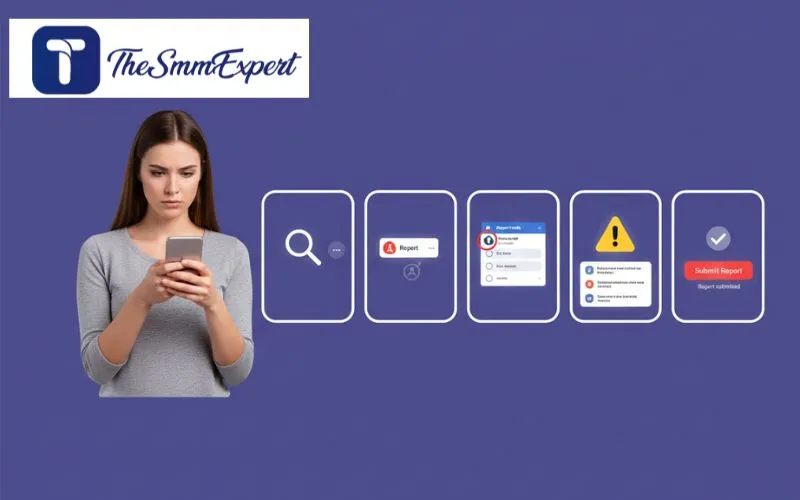 Reporting on Facebook doesn’t have to be complicated. Here’s a quick guide:
- Find the Account: Go to the profile you want to report. Double-check you have the right one.
- Open the Report Menu: Click the three dots (•••) near their cover photo.
- Select “Find support or report profile”: This starts the reporting process.
- Pick the Reason: Choose the option that fits best—like fake account, harassment, or spam.
- Submit Your Report: Follow the prompts, add any details, then hit “Submit.”
How To Track Your Report
Facebook lets you check your report status anytime:
- Go to the Facebook menu (top right corner).
- Select Support Inbox.
- Look for updates on your report.
What Happens After You Report
Once you report, Facebook reviews your case carefully. Here’s what usually happens:
- They log your report in their system.
- They check if the account or content breaks their rules.
- They decide what action to take.
Possible Actions Facebook May Take
| Action | What It Means |
| Warning | User is told to stop harmful behavior. |
| Content Removal | Posts, comments, or photos are deleted. |
| Account Suspension | User temporarily loses access to Facebook features. |
| Permanent Ban | Account is removed forever. |
Facebook usually notifies you about what happened with your report. Sometimes details are limited to protect privacy.
What to Do If Nothing Happens
If Facebook doesn’t take action right away, you have options:
- Report the issue again with new info.
- Block the suspicious account to avoid contact.
- Adjust your privacy settings to keep control.
Tips for Reporting That Works
I’ve found that clear reports get faster attention. Here’s how to make your report count:
- Pick the right reason. Facebook has many options. Choosing the best one speeds up review.
- Be clear and specific. Describe what happened with examples. Avoid vague statements.
- Include proof. Screenshots or links help a lot.
- Stay polite. Facts work better than angry words.
- Follow up if needed. Check your Support Inbox and report again if necessary.
How to Avoid Problems With Your Facebook Account
Keeping your account safe is easier than you think. Try these simple habits:
- Use strong, unique passwords. Mix letters, numbers, and symbols. Change passwords often.
- Turn on two-factor authentication. An extra lock on your account.
- Review privacy settings regularly. Limit who can see your posts and info.
- Be careful with friend requests. Only accept people you know. Ignore suspicious messages or links.
- Keep your apps and devices updated. Updates fix security holes hackers love.
How Can Reporting a Fake Facebook Account Help in Tracing Impostors?
Reporting a fake Facebook account is crucial in maintaining online safety. By notifying the platform about impostors, users contribute to a collective effort to secure identities and personal information. This collaborative approach can help platforms develop better algorithms and tools to uncover fake profiles easily, thus protecting the community.
Common Questions About Reporting Facebook Accounts
How do I report a fake Facebook account? Visit the profile, click the three dots, choose “Find support or report profile,” then follow the steps. What accounts can I report? Fake, hacked, abusive, spammy, or impersonation accounts are all reportable. Can I report anonymously? Yes. Facebook keeps your identity private when you report. How long does Facebook take to review? Usually 24 to 48 hours, but it can vary. Will the reported account be deleted right away? No. Facebook reviews the report before taking any action. Can I report from the mobile app? Yes. Just tap the three-dot menu on the profile and select “Report.”
Wrapping Up
Reporting bad Facebook accounts is a simple way to keep the platform safe for everyone. It stops fake profiles, spam, bullying, and harmful content fast. Remember, your small action helps protect your friends and yourself. Stay alert and don’t hesitate to report when you see something wrong. Keep your Facebook experience positive and secure—one report at a time.

