
To get more Facebook reviews, turn on recommendations for your Facebook page, ask your customers for reviews right after a satisfying service, copy the review link to send to customers, and respond to every review possible.
97% of consumers read online reviews nowadays before selecting a local business for their services. Having enough reviews or recommendations on your business page acts as the most crucial social proof and improves conversions.
Unfortunately, great reviews do not rely solely on quality service or product. You need to streamline the process and ask customers at the right time to achieve the best results. This guide will walk you through every step of getting more and more reviews.

First, understand what “Facebook reviews” are now.
There are no Facebook Reviews anymore. Facebook removed its old five-star rating system and replaced it with Recommendations. Now customers tap yes or no when Facebook shows the prompt “Do you recommend [your business]?” And write something for your business. It is important to know because if you ask your customers to rate your business or review the business, they might not find it. So ask them for a recommendation.
How to turn on reviews (Recommendations) for your Facebook Page
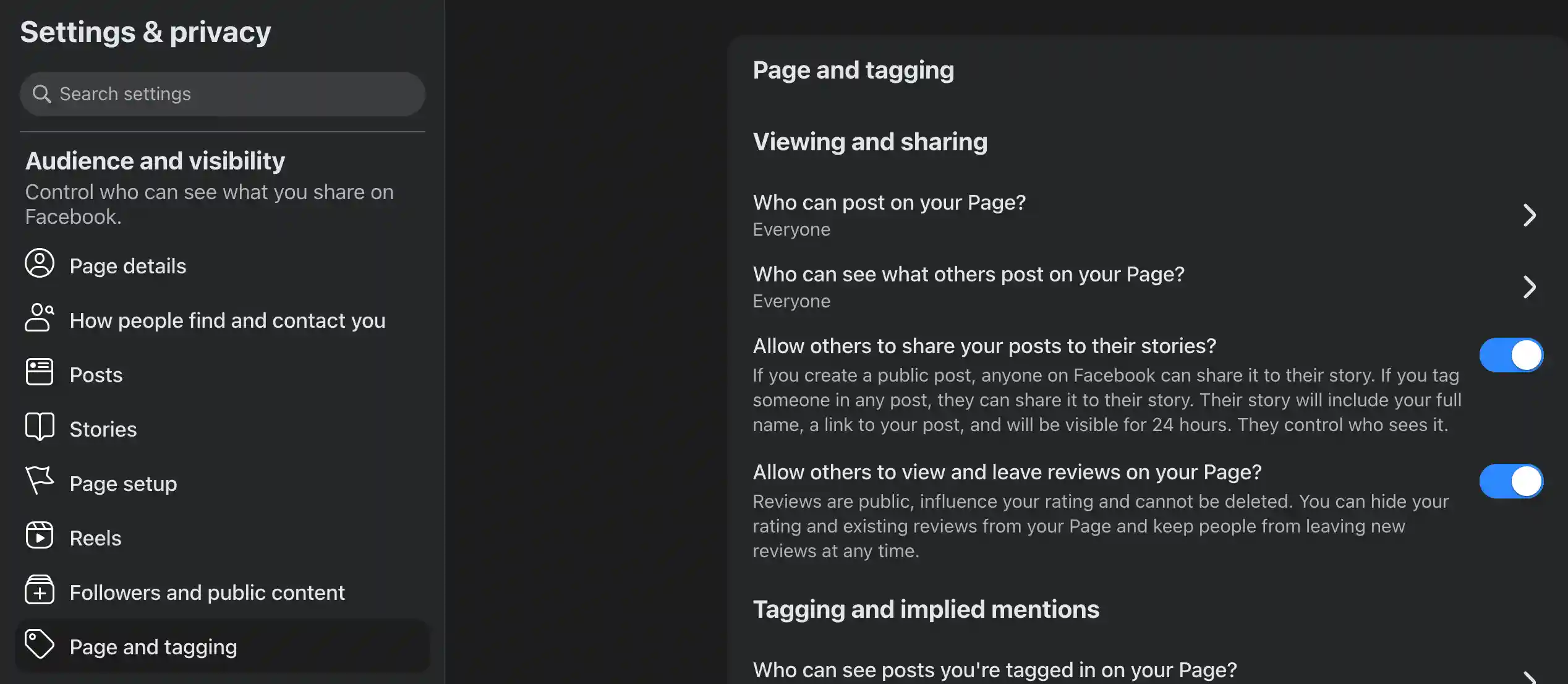
Check whether your recommendation tab is enabled because customers cannot write recommendations or reviews without this. Turning it on takes less than a minute. Follow these steps.
- Log in to your profile and open the business Page.
- Click Settings & privacy > Settings > Page and tagging.
- Find and enable “Allow others to view and leave reviews on your Page?”
Some older pages might not have the toggle to turn it on. For that, go to Settings > Templates and Tabs > Reviews > On.
How to get your Facebook review link
The fastest way to get more reviews for your Facebook page is to smooth the process. The easier you make it for the users, the more people will write reviews. A direct review link allows customers to write reviews without any other steps.
Open your business page, copy the page URL, and add /reviews to the end of your Page URL. Copy that complete URL and use it for your reviews. For example, if your business page URL is https://www.facebook.com/yourbusiness/, it will look like this: https://www.facebook.com/yourbusiness/reviews.
When sending this link through SMS, messenger, or email, your customers will be prompted to recommend and write a review.
The 12 proven ways to get more Facebook reviews
Now, you know what this is, and you have turned on the recommendation setting. Now, let’s see 12 proven ways to get more reviews.
1. Just ask – right after a win
Asking the customers at the right time beats everything. Ask your customers right after they have experienced great service. This is the time they praise your work or thank your team. Their enthusiasm stays at its peak this time, and asking them politely will increase the success rate to the maximum.
2. Ask in person or at checkout
If you run an offline business, ask customers directly at checkout. A verbal ask is the most powerful tool. People rarely refuse to write a review after asking in person. A friendly ‘if you like our service or product, would you mind writing a short recommendation on Facebook?’ will surely convert. It is always a smart decision to keep a QR code with the direct review page link so that a customer can scan and get to the recommendation page.
3. Send an email request
Email is a free and easy method to send a request. A short and warm review request after a day or two with a direct review link can increase the chance for reviews. Do a gentle follow-up if you don’t hear back within the next few days. A common pattern for sending mail is within the first 24 hours, with a follow-up within the first 7 days.
4. Send an SMS request
Emails may get ignored or end up in the spam folder. But a text message will be seen in most cases, and a direct review link will convert well. Keep the message short, polite, and attractive to improve the conversion rate. You can buy bulk SMS at a cheap rate to use for SMS.
5. Ask through Messenger or chat
Personalized asking always works better, and chat or Messenger is a great medium to do so. Ask your customers with a direct review link to write a review right after you answer their questions or solve a problem. You can even use a chatbot nowadays to automate the process.
6. Share your review link everywhere
Don’t rely on a single channel since not all your customers use the same channel. Using all the channels increases the chance. So use your website’s contact page, SMS, emails, in-person asking, newsletter, and other social media to share the links.
7. Post on your Page asking for recommendations
Satisfied customers often forget to leave a review for your business. A public post asking for reviews can trigger those satisfied customers. Use an eye-catching image and a strong call to action to remind the customers. You can even screenshot existing reviews to encourage others to leave reviews.
8. Encourage Facebook check-ins
Facebook’s check-in is another great feature to use for marketing and reviews. When a customer checks in at your business location, it shows up in their friends’ feed. It creates free visibility marketing for you. At the same time, Facebook often prompts them to review the place. Encourage users to check in and offer a small discount if they check in.
9. Add a “Review Us” button or widget to your website
You can also add a “Review Us” button or a review widget on your website page so that when a customer visits your website, it can send the customers to your review page. The widget can also display the existing reviews on the website as social proof, encouraging new customers to leave reviews.
10. Turn on notifications for new reviews
You must respond to all the reviews immediately to get more organic reviews. But how do you do that if you don’t know? So turn on the notification alert for new reviews. Simply go to Page Settings > Notifications and turn on notifications for new reviews. A fast response will signal that you care about the customers.
11. Respond to every review — positive and negative
Do you know that only 5% of businesses respond to their reviews, whereas 63% of customers expect a response within the same day? So not responding is a bad idea, and it signals that you do not care about the customers.
So reply to every review, even if it is a negative review. Handling the negative reviews properly and fixing the problem offline will satisfy the angry customers. It also encourages other customers to leave reviews when they see their feedback is valued. Remember that your future customers are seeing your response.
12. Promote your best recommendations
Word of mouth is the best marketing any business can have. That’s why share the positive reviews on your Facebook pages. Pick the best reviews and share regularly on other channels.
The cold-start playbook: getting your first 10–25 reviews
It is easier to get reviews when you have enough reviews on your page. However, going from zero reviews is the toughest one because there is no social proof. Follow the steps below to get
- Step1: Start with people who know you and the business. Contact these customers and ask them to share their experience. Since they know you, they will happily share the feedback.
- Then do some aggressive asking of your regular customers. Here, aggressive does not mean being impolite. It means ask more than regular but do not disturb others. Use all the channels and ask for recommendations.
- Once you have the base, automate the task for every future customer. Since you have social proof now, send a text or email right after every purchase, milestone, or satisfied experience.
You need to break your shyness here to get the reviews. Some people start by buying reviews for Facebook to get a head start and encourage others to write more reviews. If you are thinking of that, make sure to buy from quality buyers such as TheSmmExpert to ensure original reviews from your customers. Getting fake reviews from fake or bot profiles will damage your business reputation and may get your page banned.
Email request
Subject: Quick favor for us – how did we do?
Hi [Name],
Thanks so much for getting the service or product from [Business Name]. We believe you had an amazing experience.
If you have some time, would you please recommend us on Facebook? It will really help others find us and help us keep improving.
[Your Facebook review link]
Thank you so much, [Your Name], [Business Name]
SMS request
Hi [Name], thanks for choosing our [Business Name] today. If you liked it, would you please recommend our business on Facebook? It takes only 30 seconds. [review link]. Thanks.
Messenger/chat request (after a positive interaction)
So glad to help you, [Name]. If you can spare a moment, a quick recommendation on our Facebook Page would help us a lot. [review link]. Thanks.
In-person/verbal ask
We are really happy to help you with our (product/service). Would you mind recommending our business on Facebook? Here is the link.
Facebook post asking for recommendations:
Loving the feedback from our customers. ❤️ If we have ever helped you out, please take a second and recommend us on Facebook. Your feedback will help others find our business and help us improve the service. Tap here to share: [review link] 🙌
Make sure to customize every template with your personal touch. And never ask for a positive review. Ask them to share their experience.
Facebook reviews not showing up? Troubleshooting
Business owners often complain about this problem: reviews do not appear or vanish. Here are the reasons for you.
| Problem | Likely cause | Fix |
|---|---|---|
| The reviews tab does not show. | You haven’t enabled the recommendations. | Enable the recommendation. |
| A customer wrote a review, but it’s not showing. | Review is not set to Public. | Ask them to change their privacy from friends to public. |
| Reviews suddenly vanished. | Might be a bug. | Contact Facebook. |
| No recommendation score. | Fewer than 5 recommendations. | Get more recommendations. |
| Customers can’t recommend. | Page unpublished or recommendation is turned off somehow. | Re-enable it and make sure your Page is published. |
We have a detailed guide for Facebook Reviews Not Showing. If you are suffering from this problem, check that guide.
Facebook review rules and what to avoid
When desperate for reviews, do not make these mistakes and understand the rules.
- Never buy Fake Facebook reviews since it violates the terms and policies of Facebook.
- Be careful with incentives, even when offering a small discount or gift.
- You can’t delete a bad review even if you don’t like it.
Frequently asked questions
Are Facebook reviews still a thing?
Yes, they are still a thing, but the name has changed to Recommendations under the same Reviews tab. And you cannot rate the business anymore.
How do I create a Facebook review link?
Get your business page URL and add /reviews to the end of the URL. The creation is done. Share it with the audience.
Can I delete a bad Facebook review?
No. You cannot delete a bad review even if it is unfair. However, you can report it if this breaks Community Standards.
Can I buy Facebook reviews?
Yes, you can, but it violates Facebook’s terms of service. If you buy them, make sure to buy original reviews from original customers.
How many reviews do I need to compete?
It depends on the competitors, industry, and your business size. However, having 100+ recommendations is good.
Are Facebook reviews anonymous?
No. Facebook shows the reviewer’s name and profile.

