
If your Gmail account is hacked, immediately change the password as soon as you understand it. Then sign out of all sessions and remove any connected devices, apps, filters, and forwarding rules to kick the hacker or attacker out. Finally, add a 2-step verification with your phone number so the attacker has zero chance of winning it back.
If you are locked out, use your original device, location, and network to recover the Google account. Make sure to act fast since it will limit the damage. But changing the password is not enough, and this guide will explain why.
Do this now: Which path applies to you?
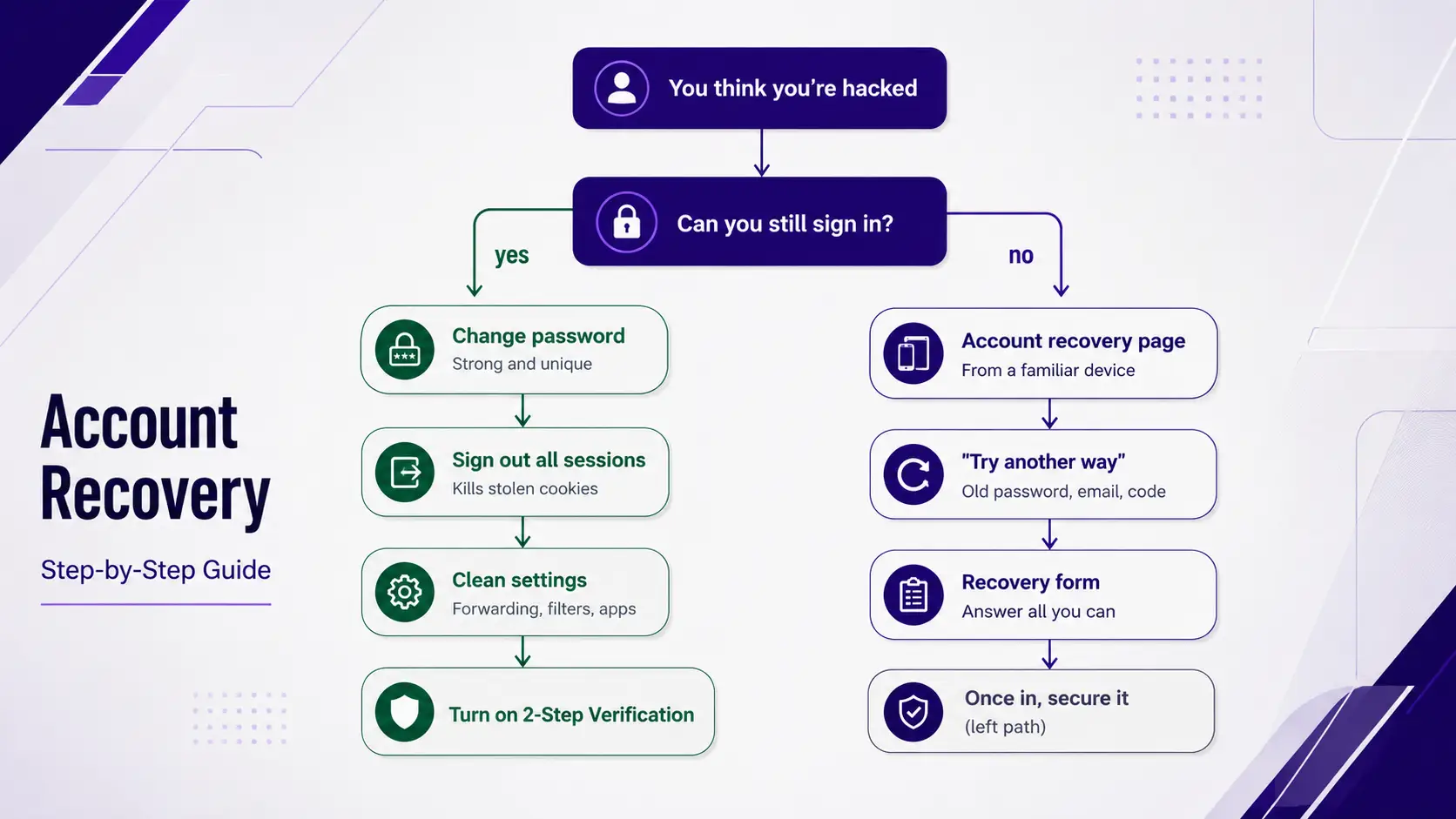
If you think you are hacked, try to sign in. If you can, lock the hacker out and undo their changes. If you fail to log in and are locked out, your utmost priority should be recovering your account. We will discuss everything below.
Signs your Gmail has been hacked
The cleanest signs that your Gmail has been hacked are being unable to sign in, unfamiliar sign-in locations or devices, and some emails in the Sent folder you haven’t written. Hackers move quietly, so watch for these red flags if you are suspicious about being hacked.
- Your password is not working, and you haven’t changed it.
- Friends or contacts report receiving spam or strange emails from your Gmail.
- Google sends you a notification of a sign-in from an unknown device or unusual location.
- Your recovery email address or phone number was changed, and you didn’t change it.
- Unfamiliar forwarding rules, filters, and vacation responder in the settings you didn’t set.
- You are getting notifications about verification codes or password resets for accounts you didn’t try to sign in to.
- Inbox emails are missing or appear as already read when you haven’t read them.
To confirm that, scroll to the bottom-right of your Gmail inbox and click ‘Details’ under “Last account activity.” It will give you detailed information regarding the latest sign-in locations, device types, and IP addresses. If you see suspicious activity, consider that your account is compromised and you must act immediately.
If you can still sign in, lock the attacker out
If you can still log in to your Gmail account and confirm that your account is compromised, you must follow the steps below. Make sure to use a device you normally use from a usual network and location.
Step 1: Change your password
Go to your Google Account > Security > “Password,” and create a strong, unique password. It must have at least 12 characters with a combination of lowercase and uppercase letters, symbols, and numbers. Try something that you have never used anywhere and is not common. However, remember that it will not evict the hacker who has an active session.
Step 2: Sign out of all other sessions and devices
Go to your Google Account > Security > Your devices > Manage all devices and then review every device and session. Try to ‘Sign out’ from every session, even if you recognize that session. This will lock out the hacker even if he has access to your other devices.
Step 3: Restore your recovery phone and email
Maybe the attackers have changed the recovery email and phone number already to lock you out again. So check your recovery email address and phone number under ‘How you sign in to Google.’ Remove anything you find unfamiliar and replace it with your own details. If you are sure that your account is compromised and the hacker has yet to change the recovery options, it is better to change them with another email and phone number to stay safe.
Step 4: Remove hidden forwarding, filters, and delegation
This is the most important part that most people ignore because they don’t know it. They stop right after changing the recovery options and passwords. Attackers can still read your email and get valuable information through this option even after you have secured your account.
Log into your Gmail account and open settings. Then click on ‘See all settings’ and check three places: under “Forwarding and POP/IMAP,” “Filters and Blocked Addresses,” and “Accounts and Import.”
- Delete any forwarding address you find under “Forwarding and POP/IMAP.”
- Remove any rules that delete, hide, or forward any message under “Filters and Blocked Addresses.”
- Check “Grant access to your account” (delegation) and “Send mail as” for anything unfamiliar under the “Accounts and Import.”
Also, make sure your display name and signature are the same as before.
Step 5: Revoke third-party app access and app passwords
Hackers often authorize a third-party app right after they hack your account to retain access without your password. To check that, go to your Google account > Security > “Third-party apps with account access.” Remove anything and everything you do not use or recognize. Check the app passwords set up under 2-step verification and delete anything you didn’t create.
Step 6: Run Google’s Security Checkup
Once you’ve done everything mentioned above, visit myaccount.google.com/security-checkup for a better review of recent security events, account permissions, and connected devices. Fix everything the system flags and confirm that your cleanup is complete.

Why changing your password isn’t enough.
Changing the password will not remove the attacker who has set up a forwarding rule, authorized some connected apps, and stolen your session cookies. You must undo these manually and separately to lock out the hacker.
When you sign in, Google issues a session token to your browser so you don’t have to re-enter your password every time. Phishing kits and malware steal that token directly and let an attacker stay signed in without having your new password. Security reporting has repeatedly documented this attack through infostealer malware doing exactly this from 2024-26.
The fix is to log out of all the sessions that we have mentioned in the steps to invalidate the stolen token. Similarly, a connected app and forwarding rule keep working after a password change. Removing and deleting them will remove the hacker’s access from your account.
If you’re locked out: recover your account.
However, if you are unable to log in and the hacker has changed your password, you must recover your account from the accounts.google.com/signin/recovery page by verifying your identity. Use a trusted device, browser, location, and network that you have used before during recovery since Google weighs those familiar signals when deciding your identity.
Enter your email and the last password you remember. If that does not work, click ‘Try another way’ and try other alternatives. Use your recovery phone number and email, a backup code, or identity questions to recover your Gmail account. Try to answer all the questions by guessing, even if you don’t know the accurate answer. Do not skip a single question. If you fail to recover through any of these methods, Google offers a manual review form, but chances of recovery are very low here.
Still confused about recovery? We have a detailed guide to show you different methods of recovering your Gmail account in step-by-step. Check that out. How to Recover a Gmail Account Without a Phone Number.
If you fail to get your account back even after all that effort yet need aged Gmail accounts for business and marketing purposes, you can contact professionals like TheSmmExpert.
Secure everything your Gmail unlocks.
If you are sure your account has been compromised, you must change the passwords of your important accounts linked to this Gmail account. Banking, social media, cloud storage, and shopping are some important accounts that hackers can attack through this Gmail. They will simply reset the passwords of those accounts with that Gmail.
They can also see the password, documents, and payment method if you save them on Google Drive or Gmail. Prioritize those accounts that hold payment details or money to keep your money safe. Check each of those accounts and change the email and phone number.
Scan your device for malware.
If your pc or mobile is attacked by malware, removing the hackers from Gmail won’t work, and they will steal your new password. That’s why scan your device before trusting your Gmail account again. Install an antivirus and run it to remove anything dangerous. It matters because you do not know how the hack happened. Consider resetting the entire system if you find anything unusual even after using antivirus.
How to Avoid these Gmail recovery scams
You must know that there is no Google number or call centre or support system where you can call and ask for help to recover your account. There is no third-party software or apps that can recover or unlock your hacked Gmail account by doing anything but the methods mentioned above.
If someone claims to have such tools, numbers, or apps, these are scams and frauds. You will find such services when searching on Google, but do not fall into their traps. Even AI-generated emails and voice may feel professional and similar to Google agents.
Google will never call you to recover your account and never ask for verification codes or passwords. If someone contacts you claiming to be an agent of Google, consider it fraud and take legal action if you can.
How to Prevent it from happening again
The best protection you can have is 2-Step Verification or a passkey. Follow these steps once you are back in control to ensure the highest safety.
- Turn on 2-Step Verification first and use a physical security key over SMS or an authenticator app. Use your device’s fingerprint, PIN, or face for stronger protection against phishing.
- Use a unique password with a combination of numbers, lowercase and uppercase letters, and symbols. Use something uncommon for maximum security.
- Add a recovery contact, such as your friends, family, or colleague, along with the phone number and email address.
- Get into Google’s Advanced Protection Program if you are someone with regular attacks, such as an activist, a journalist, or an executive.
- Check the connected apps and forwarding rules regularly to see any unusual events, since these are the secret weapon for hackers.
- Visit haveibeenpwned.com and check if your Gmail account has appeared in a known data breach or not.
Comparison: what the attacker changed and how to fix it
Follow this checklist for maximum cleanup.
| What to check | Where to find it | What to do |
| Active sessions | Security › Your devices › Manage all devices | Log out from everything. |
| Recovery phone number & email | Security › How you sign in to Google | Add a new number and email. |
| Forwarding | Gmail Settings › Forwarding and POP/IMAP | Delete anything you did not save. |
| Filters | Gmail Settings › Filters and Blocked Addresses | Remove rules you didn’t create |
| Delegation & “Send mail as” | Gmail Settings › Accounts and Import | Remove any unfamiliar access. |
| Third-party apps | Security › Third-party apps with account access | Revoke all the apps. |
| App passwords | Security › 2-Step Verification › App passwords | Delete everything and add something new. |
| Display name & signature | Gmail Settings › General / Accounts | Add your own. |
Frequently asked questions
How do I know if my Gmail is hacked?
You will be unable to sign in to your account, receive notifications about sign-ins from new devices, find emails in the Sent folder that you didn’t write, see new recovery details, and see uncommon forwarding rules and filters.
I changed my password, but the hacker is still there – why?
A password change does not remove the hackers once they stole your session cookie, added a forwarding rule, and authorized a connected app. You need to sign out all sessions, delete those rules, revoke app access, and then run a security checkup to remove the hacker.
Can I know who hacked my Gmail?
It is difficult to see who hacked your Gmail, but you can see their rough locations, IP addresses, and devices from the recent activity through the ‘Details’ link available in Gmail. However, it is impossible to find the individual.
Can I call Google about a hacked account?
No. Google does not have any phone number or helpline for personal account recovery. And remember that the Gmail support number or helpline you find online is a scam, and stay away from it.
Should I delete my account after it’s hacked?
No, you should try recovering it from the hacker and do a complete cleanup with a new password, recovery options, 2-step verification, and a new forwarding rule and app access.

