On this page 16 sections
- What “Marketplace verified” actually means
- Buy Facebook accounts with Marketplace: what you actually get
- Why someone else can’t verify your account for you
- Every Facebook account has Marketplace. Why does this cost more than an account setup?
- The message you see, what it means and what to do
- Common reasons Marketplace stops a seller
- What our Marketplace verification help includes
- Marketplace verification plans and prices
- Talk first, then order: how we work together
- Fix it yourself first: a free checklist
- Mistakes that make Marketplace limits worse
- How long it takes
- Pros and cons of getting help with Marketplace verification
- How ordering works
- Questions
- Reviews
Looking to buy a Facebook account with Marketplace? We don’t sell Facebook accounts, and we don’t sell “Marketplace verified” accounts. Facebook checks that the person selling on Marketplace is the real owner of the account: a selfie or video selfie is matched to the profile’s own photos, and some steps ask for an ID in the owner’s name. Nobody else can pass that check for you. What we do is find out why Marketplace is stopping you, show you each step in chat or in a recorded video, and write the review request or appeal with you when your access has been limited. We never ask for your password. Plans start at $99, with $149 and $199 plans for accounts that are already restricted. Please talk to us before you order, so we can tell you which plan fits, or that you don’t need one.
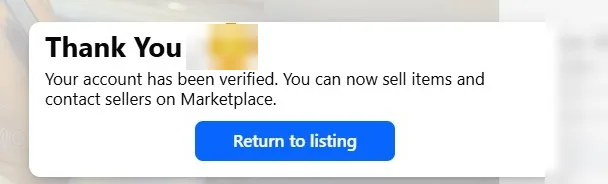
Every Facebook account has a Marketplace tab, so the message “Your account has been verified. You can now sell items and contact sellers on Marketplace” surprises a lot of people. They didn’t know there was anything to verify until Facebook stopped them from listing, messaging a buyer or turning on shipping. Most of the people who write to us are stuck at that point: a verification screen that won’t accept their phone number, a selfie step that keeps failing, or a “You can’t use Marketplace right now” notice with no clear reason. This page explains what each of those screens means, what you can fix yourself for free, and where our help is worth paying for.
What “Marketplace verified” actually means
Three different things get called “verified” on Facebook, and mixing them up is the most common reason people waste time or money:
| Name | What it is | Cost | Needed to sell? |
|---|---|---|---|
| Marketplace identity check | A check Facebook shows when it wants to confirm that a real person owns the account: a phone or email code, a selfie, or an ID upload. When it passes you see “Your account has been verified”. | Free | Yes, when Facebook asks for it |
| Facebook Verified badge | A free badge launched in July 2026. You record a short video selfie and Facebook compares it with your profile photos. The badge shows on Marketplace, Groups, Dating and your profile. | Free | No, but buyers trust it |
| Meta Verified | A paid monthly subscription with a government ID check, a blue badge and account support. | Monthly fee | No |
Facebook explains the badge types on its own verified badges help page. The free badge has its own rules: you must be 18 or older, the account must be in good standing, especially on fraud and scam rules, and Pages and professional-mode profiles can’t get it. It is rolling out country by country, so not everyone sees the option yet. Meta’s announcement of Facebook Verified also says plainly that the badge is not an endorsement: verified sellers still have to follow the same rules as everyone else.
Buy Facebook accounts with Marketplace: what you actually get
“Buy Facebook accounts with Marketplace” is one of the most common searches that brings people to us, so here is the honest answer. Sellers offer old or “aged” profiles and promise that Marketplace already works on them. Marketplace is not a feature you can buy with an account: every Facebook account has it, and what decides whether you can sell is whether the account passes Facebook’s owner checks. A bought account was set up by someone else, so it passes those checks only as long as Facebook never asks the new user to prove who they are. When it does, usually within days of a new login from a new phone and country, the account is locked, and the seller often still controls the recovery email or phone.
So the money spent on a Facebook account with Marketplace usually buys a few days of selling at best. The same money spent on getting your own account through verification buys an account that stays yours.
Why someone else can’t verify your account for you
Every one of these checks is built to confirm the owner. A selfie is compared with the photos already on the profile, an ID has to match the name on the account, and a code goes to the phone or email the owner controls. If John’s account is verified with Joe’s face or Joe’s ID, the match fails, and if it somehow passes, the account now belongs on paper to someone else. That breaks Facebook’s rule of one real account per person and is the fastest way to lose the account completely.
That is also why buying a Facebook account with Marketplace rarely works for long. Our Facebook account setup service explains this in more detail; in short, the account you sell from has to be yours.
Every Facebook account has Marketplace. Why does this cost more than an account setup?
It is a fair question. Our Facebook account setup starts at a lower price, and Marketplace is already part of every account, so a separate Marketplace service can look like paying twice. The difference is in the work:
- Account setup builds a new, clean profile, Page and business portfolio. It’s mostly predictable work that we control from start to finish.
- Marketplace verification starts with an account that Facebook has already flagged for a check. We first have to find out which check it is and why it was triggered, then guide you through it, and redo the step when it fails. Most people don’t know a check exists until it blocks them, and Facebook’s screens rarely say what went wrong.
- A restricted account is harder again. Access has already been limited, so the work is reading the restriction, fixing what caused it, and writing a review request that Facebook’s team can actually say yes to. That is why the restricted and full recovery plans cost more.
If your account only needs a simple phone or email code, you may not need us at all. Tell us in chat what you see, and we’ll say so.
The message you see, what it means and what to do
| What Facebook shows | What it usually means | First thing to try |
|---|---|---|
| “Confirm your identity” or “Verify your account” before listing | A routine owner check, often on new or recently changed accounts | Use the phone number or email already on the account; try the app and the website |
| The code never arrives, or “Something went wrong” | The number is linked to another account, or the step is rate-limited | Wait 24 hours, then try email instead of SMS; don’t keep retrying |
| “Too many attempts” | Repeated failed tries have locked the step for a while | Stop for a day or two; repeated attempts make the lock longer |
| Selfie or ID rejected | Profile photos don’t clearly show your face, or the name doesn’t match the ID | Add clear photos of yourself first; check that the name matches your ID |
| “You can’t use Marketplace right now” | Access was limited for a rule, a report or unusual activity | Open Account Status and use Request review if it’s there |
| “Marketplace isn’t available to you” | Age, country, a new-account hold, or an extra profile instead of your main one | Check your date of birth, switch to your main profile, turn off any VPN |
| A listing was rejected | The item or the wording broke a commerce rule | Read the reason, fix the listing, then request a review |
The rules behind most listing problems are in Meta’s Commerce Policies. A few things on that list, such as services, digital products, animals and anything health-related, get blocked even when the seller means well.
Common reasons Marketplace stops a seller
A new or quiet account
New profiles often get a holding period before they can sell, and an account that sat unused for months behaves much like a new one. Facebook wants to see normal activity before it trusts the account with buyers.
A profile that doesn’t look like a real person
No face in any photo, a name that doesn’t match the ID, an empty profile or a brand name on a personal account all make the selfie and ID checks harder to pass.
Several accounts or a changing location
Logging in to many accounts on one phone, using a VPN, or listing from a country where Marketplace isn’t offered can all trigger a check or a limit.
Earlier rule breaks
Rejected listings, buyer reports and removed posts add up. One rejection rarely matters; several in a short time often lead to a restriction.
What our Marketplace verification help includes
- A clear diagnosis. You tell us or show us what you see, and we tell you which check or restriction it is and what usually works.
- Step-by-step guidance. We walk you through each screen in chat, and record a short video of the exact steps when that’s easier to follow.
- Profile fixes before the check. Photos, name and profile details that help the selfie and ID match succeed the first time.
- Review requests and appeals written with you. Short, factual text that explains what happened and what you changed, sent from your own account.
- Follow-up. We stay with you until Facebook answers, within the follow-up time of your plan.
What we don’t do: we don’t sell accounts, we don’t use anyone else’s face or ID, we don’t use fake documents, and we don’t ask for your password. If you choose to share access, that is your decision, and we’d still rather guide you. Facebook decides every check and every review, so nobody can honestly promise you a result. If your case looks hopeless when we first look at it, we’ll tell you before you pay.
Marketplace verification plans and prices
Verification ($99) is for accounts that Facebook is asking to verify but haven’t been restricted: failed codes, a selfie step that keeps failing, an ID that isn’t accepted, or a seller who simply doesn’t know where to start.
Restricted account ($149) is for accounts that already see “You can’t use Marketplace right now” or a similar limit. It adds the restriction check, the appeal and profile trust fixes, with 14 days of follow-up.
Full recovery ($199) adds rejected listings, shipping and payout identity steps where your country offers them, a selling plan that keeps the limit from coming back, and 30 days of follow-up.
Not sure which one you need? That is exactly what the chat before your order is for.
Talk first, then order: how we work together
- Talk to us first. Message us by live chat, WhatsApp or Telegram, and send a screenshot of what Facebook shows you.
- We tell you the plan. Or we tell you that you don’t need one, if it’s a simple fix.
- You order and we start. We prepare the steps and any text, and a video if it helps.
- You complete each step on your own account. We check each screen with you as you go.
- We follow up until Facebook answers or your follow-up time ends.
Fix it yourself first: a free checklist
- Check that your date of birth shows you are 18 or older.
- Switch to your main profile, not an extra profile.
- Turn off any VPN and allow location access for the Facebook app.
- Update the app, then try the same step on facebook.com in a browser.
- Add at least one clear, recent photo of your face if your profile has none.
- Open Profile status (Account Status) and read any Marketplace notice in full.
- If there’s a Request review button, use it once, with a short, honest explanation.
- Then wait. Repeated attempts often lengthen the lock.
If none of this works, or you’re not sure what a notice means, that is where we help.
Mistakes that make Marketplace limits worse
- Opening a second account. Facebook may treat it as dodging the limit, and both accounts can end up restricted.
- Retrying the same step again and again. It leads to “too many attempts” and a longer wait.
- Relisting a rejected item straight away. Fix the reason first, or the next rejection counts against you too.
- Sending codes to strangers. Facebook will never ask you to share a verification code, and anyone who does is very likely a scammer. We never ask for your codes.
- Waiting too long to ask for a review. A rejected listing can only be reviewed once, and only for about 180 days after the rejection. Some rules can’t be appealed at all.
How long it takes
Our work usually takes a few days. Facebook’s part has no fixed time: simple code checks pass in minutes, selfie and ID checks often take a day or two, and review requests can take from a day to a few weeks. Access also tends to come back in stages: browsing first, then messaging, then listing. Keep using the account normally while you wait; a week or two of ordinary use helps more than repeated attempts.
Pros and cons of getting help with Marketplace verification
Pros
- You learn which check you’re facing instead of guessing.
- Fewer failed attempts, so fewer extra locks.
- Appeals written clearly, with the facts Facebook’s team needs.
- Your account stays yours: your face, your ID, no password shared.
- Help in chat, plus recorded videos when they’re easier to follow.
Cons
- Facebook makes the final decision, so no one can guarantee the result.
- Some restrictions, especially after serious rule breaks, can’t be reversed.
- You still have to do each step on your own account yourself.
- Simple code problems are often free to fix yourself with the checklist above.
Selling on Marketplace is often the first step for small sellers who then grow into a Page and ads. When you get there, see our full list of Facebook services.
How ordering works
- 1Choose a packagePick one above. You can change it on the next step.
- 2Tell us your detailsJust your email, plus anything the package needs.
- 3Pay and trackPay your way, then follow every step on your tracking page.